Lab: SSH keys, DO/Cloudflare tokens and signed R2 access. PLO: PLO3 / PLO2. Points: 7.
Overview
A client sends the unit a rough cut. Behind one file there are keys, identities and a boundary: the clip is encrypted at rest by the storage provider, served through a certificate-backed edge, read by a Worker that holds a signing secret, and — in a later session — sent to a managed inference API. Nothing about that sentence is a cryptography problem. It is a credential problem.
The one big idea for this session: a credential is a scoped capability — it has a scope, a clock, a custody rule, a revocation path and an audit trail, and the five credential classes this stack gives you fail in different ways.
That reframing is the point of the session. The provider encrypts the substrate and runs the key service; you never hold a key-management service of your own. What you hold is a small set of credentials and signing keys, and every boundary in the unit's media pipeline is drawn by one of them. By the end you can answer, for each credential: what can it reach, when does it stop working, where does the value live, how do you revoke it, and what record proves who used it. Those five questions are the inventory. The lab makes you answer them for real credentials, then hands you a decision you cannot dodge — which residual risks you are willing to defend.
Lesson
One asset, five credentials
Follow one synthetic clip through its life: capture, ingest, store, transcode and back up, infer, deliver. At each step ask three questions: what is the data class, which control protects it, and who owns that control. The answers differ by step, and the credential that enforces each control differs too.
Capture is the student's own machine; the control is device policy and the discipline of not bringing real client footage into a classroom.
Ingest is TLS to an edge plus a Worker that validates what it accepts. The credential is the Worker's secret and the route it guards.
Store is a private R2 bucket encrypted at rest with provider-managed keys. The credential is an R2 API key pair scoped to that bucket.
Transcode and back up happens on the NAS; the credential is an SSH key pair and, from S5, a backup key.
Infer leaves the unit's boundary for a third-party endpoint; the credential is an API key, and the data class decides whether the call is allowed at all.
Deliver is a signed capability: an HMAC signature from the Worker, or a presigned object URL. The credential is a capability with a clock.
Security here is not one setting. It is a chain of decisions, and the weakest link — usually a credential that is broader or longer-lived than its job needs — decides the risk.
Confidentiality: two key families and a session key
A symmetric key is one secret used to encrypt and decrypt. It is fast and it is what protects the bytes. Its weakness is distribution: both sides need the same secret, and sending it over the same channel defeats the purpose.
An asymmetric key comes as a pair: a public key anyone may have and a private key only the owner holds. It solves distribution but is slow, so media files are never encrypted directly with it.
Real systems combine them. A new session key encrypts the payload with a symmetric cipher, and the recipient's public key wraps the session key. That is what a TLS handshake does: the slow operation happens once, on a small key, and the large payload uses the fast key. Encryption at rest applies the same idea to stored objects, except that the provider's key service does the wrapping for you — which is exactly why key custody, not key mathematics, is the interesting question on this stack.
An SSH key pair is the asymmetric case in its simplest form. The public key sits in /root/.ssh/authorized_keys on the server; the private key never leaves the laptop. Authentication succeeds when the server can verify a signature that only the private key could produce. There is no password to reset, which is the security you want and the lockout you must plan for: Rocky Linux on DigitalOcean has no root password recovery path.
Integrity: hash, MAC and signature
A hash turns any input into a fixed-length fingerprint. Change one byte and the fingerprint changes completely. SHA-256 is the working example here. A hash detects accidental corruption; it does not prove who made the file, because anyone can compute one.
A message authentication code (MAC) is a keyed hash: only parties who hold the key can produce or verify it. It detects tampering between parties who already share a secret. The Worker's /asset/:id/file?exp=&sig= route is exactly this: the Worker and the signing script share SIGNING_KEY, the signature covers the asset id and the expiry, and a mismatch returns 401.
A digital signature uses an asymmetric private key, so anyone with the public key can verify it and the signer cannot deny it. Media manifests and archive checksums use these three tools in different places: hash for integrity, MAC for a pipeline the unit controls end to end, signature for a release that leaves the building.
Three corrections to the legacy Thai note matter here. "Encrypt with the sender's private key and decrypt with the sender's public key" is signing, not encryption: it provides authenticity, not confidentiality. "Hash plus salt equals MAC" conflates password storage with message authentication — a MAC is a keyed hash, while salt is for storing passwords. And the "mirror attack" is a precomputed-hash or rainbow-table attack. The course uses the corrected names.
Certificates and trust chains
A certificate binds an identity — a domain name — to a public key, and a certificate authority signs that binding. The operating system and browser ship a trust store of authorities, and a certificate that chains to one of them is accepted. That is why HTTPS at the edge is more than a padlock: the viewer verifies that the edge it reached is authorised for the name, and the connection runs on a session key.
Certificates expire and are revoked. An expired certificate is a failure of process, not of cryptography, which is why renewal is an operational control. On this stack you meet the same shape twice: Cloudflare issues and renews the edge certificate for a proxied record, and a workers.dev hostname carries a certificate you never see. You inherit that control; you do not operate it.
Who encrypts the substrate, who holds the credentials
The legacy lesson spent its time on customer-managed encryption keys. On DigitalOcean, Cloudflare and OpenRouter there is no customer-managed key service in the student stack — and that absence is the lesson, not a gap.
DigitalOcean Volumes encrypt at rest with provider-managed keys. You choose the volume size and who can attach it; you do not choose the key.
R2 encrypts every object at rest with provider-managed keys, always on. You choose who can read the bucket; you do not choose the key.
OpenRouter terminates your request at a model endpoint. You choose the model and the retention policy per request; you do not hold the key that protects the endpoint.
What you do hold is a set of credentials and signing keys: the SSH key that opens the Droplet, the DigitalOcean token that creates it, the R2 key pair that reads the bucket, the Worker secret that signs a delivery URL, the Cloudflare token that rotates that secret. Those are the keys the unit actually controls, and controlling a key you hold is a custody problem: where is the value stored, who can read the file, what happens when the laptop is stolen, and what revokes it.
The consequence is blunt. If a provider-managed key were compromised, you could not rotate it yourself — you would open a ticket. That is why the customer-side controls concentrate on credentials: they are the levers you can actually pull, and pulling them quickly is the difference between a scare and an incident.
A credential is a capability with a clock
A private object stays private. A signed URL grants scoped, expiring access: a method, a resource and an expiry, signed with a credential the service can verify. The object never becomes public, and the recipient never holds your credential — only a URL that the service will honour until the clock runs out.
Compare three ways to share a clip with a client:
Approach
What the recipient holds
When it stops
What you can revoke
Public bucket
An anonymous permanent address
Never, unless you change the bucket
The whole route
Your own proxy
A URL to your service
When you change your code
Access per request, because you are the access control
Presigned URL
A signature over method, object and expiry
At the expiry you chose
Nothing per URL; only the credential behind it
The presigned URL is not "less secure because it is a URL". It is a bearer capability: whoever holds it can use it, as many times as they like, until it expires. Two consequences follow, and the lab makes you observe both.
First, the TTL is the control. A 60-second URL that leaks is a 60-second problem; a 24-hour URL is a day. Second, R2 presigning is computed locally — the signing library uses the key pair and never calls the service — so a read-only key can produce a URL string for an operation it will later be denied at use. Presignac communicates nothing; the denial arrives only when someone tries the URL.
Cloudflare's Worker route in the S4 sample is the other half of the same idea. The Worker holds SIGNING_KEY and mints /asset/:id/file?exp=&sig=; the key never leaves the Worker, the URL expires, and rotation invalidates old URLs at once because the Worker now checks against a different secret. Presign for objects, HMAC for routes that need a check before the bytes leave.
The five credential classes
This is the taxonomy the lab uses, and the names are exact — "token" unqualified is ambiguous on this stack.
Class
Example in the course
Scope lives in
Clock
Custody
Revocation
Audit
SSH key pair
course-s1-<id>, course-s7-rotate
/root/.ssh/authorized_keys on each host
Until the line is removed
~/.ssh, private key chmod 600
Remove the line from the host; deleting the account key is bookkeeping
doctl compute ssh-key list; /var/log/secure on the host
DigitalOcean personal access token
course-s1-<id> (S1–S3), course-s7-read
Custom scopes, per type and action, immutable after creation
30–90 days
doctl config or a shell variable, chmod 600
Delete in the panel
Panel → Settings → Security → Security History
Cloudflare API token
course-s7-worker-editor
Resources and permissions, e.g. one Worker → Editor
The expiry you pick
A shell variable
Delete in the panel
Cloudflare Audit Logs
R2 API key pair
course-s7-vault-read
Object Read, restricted to one bucket
No expiry; until deleted
Two shell variables; secret shown once
Delete or roll in the panel
Token administration in Audit Logs; object access is not logged
Worker secret
SIGNING_KEY
The Worker's environment, at runtime
Until the next secret put or secret delete
Encrypted secret store, never printed
wrangler secret delete, then deploy
wrangler versions list; Audit Logs may record the change
Three asymmetries in that table are worth memorising, because they decide how incidents actually go.
Scope is per action, not hierarchical. A DigitalOcean token with droplet:read is not "a weaker droplet token" — it is a token that can read and cannot delete. If the job needs a delete, mint a token that can delete that one thing; never widen to droplet:* because a denial annoyed you.
A scope is only real when the API refuses the call. The label on a credential — "this token is for one Worker", "this key is read-only" — is a claim about intent, and the blast radius is what the API actually permits. Test it: take the credential and attempt the operation you believe is outside it, then record the status. In the verified run for this course, a Cloudflare token created with Individual Workers → one Worker → Editor still listed and wrote another Worker's secrets, so its true blast radius was the account's Workers estate, not one script. The register records the observed permission, not the panel's wording; a denied call is evidence, and so is an unexpected success.
The clock is not always there. R2 key pairs have no expiry by default; an SSH key line never expires. A credential with no clock has to be revoked by hand, so the inventory entry for it must say who is responsible for noticing.
Deleting a credential is not the same as revoking access. This is the trap the lab drills.
Identity: least privilege, blast radius and custody
Least privilege means the smallest action on the smallest resource for the shortest time. The practical question is blast radius: if this credential leaks right now, what can the holder reach?
An SSH key that logs into one tagged Droplet has a blast radius of one host.
A Cloudflare Workers token can rotate a Worker's secret and is refused an R2 call, because its permission family is Workers only. Whether the resource picker actually narrowed it to one Worker is a different question: the API enforces the permission family, and on this stack it did not enforce the single-Worker clause — see the note on labels below.
A bucket-scoped R2 key can read that bucket, and a presigned URL from it is a capability to one object.
A DigitalOcean token with droplet, volume and SSH-key write has a blast radius of the whole team — which is why S1's token is the one to regenerate rather than reuse.
Provisioning and operating credentials are different jobs, and mixing them is the most common way to end up with a broad token. A provisioning credential is broad and used once: it creates the resource, then its job is done. An operating credential is narrow and used every day: read the bucket, rotate the secret, sign the URL. S4 taught the same split with a deployment token versus a delivery capability. When a lab asks you to "create a token", ask which of the two the job needs.
Custody is the third leg. The value lives somewhere, and where it lives decides how it leaks:
Files (~/.ssh, the doctl config) need chmod 600 and a rule that they never enter the repository. git grep is the check; the panel's scopes are the damage bound.
Environment variables are better for short-lived work and worse for audit: they appear in shell history and process listings. Export them into the lab shell and unset them when the proof is done.
A Worker secret store is the right home for a value the service must use. You cannot read it back, which is a feature: nothing to copy off the Worker.
The lab's first command is therefore a search of the repository for credential-shaped strings, not a cloud call. A credential in git history is compromised even if you delete the file tomorrow.
Audit: two surfaces, neither complete
An audit trail is what turns "we think" into "we can show". Neither provider gives you the whole picture, and the gap is itself a risk-register row.
Cloudflare Audit Logs are free on every plan, retained 18 months through the API and 90 days in the UI. They record administrative events: bucket create and delete are explicit. Token administration and Worker secret changes are likely present but not enumerated in the documentation, so the lab does not claim them — wrangler versions list is the reliable record of the script change. Object access is not in Audit Logs at all; R2 Data Access Logs are a separate, short-retention, successful-requests-only product and are an extension, not a core step.
DigitalOcean Security History records token and Droplet events, but it is UI-only: there is no API and no export, and DigitalOcean does not publish a retention period. The lab captures it live because that is the only way to keep it. /v2/actions records resource actions, not token use, so it cannot answer "who used this token".
Write the audit entry for each credential in the inventory as "where I would look", not "what the provider promises". A trail you have not opened is a hope.
Shared responsibility: of the cloud, in the cloud
Shared responsibility is the map of who secures what. The provider secures of the cloud — facilities, hardware, the network, the software of its managed services, the encryption engine. The customer secures in the cloud — data, identity, configuration, access, and the choice of service. The split moves by service, and on this stack it looks like this.
Service
Provider owns
Customer owns
DigitalOcean Droplets and Volumes
Hypervisor, hardware, network, volume encryption at rest
SSH keys, firewall rules, token scopes, snapshots, what runs on the host
Cloudflare edge and R2
Edge network, TLS termination, certificate issuance, object encryption at rest
Zone configuration, cache rules, bucket privacy, R2 key scope, Workers code and secrets
Cloudflare Workers
Runtime, isolation, secret store encryption
The Worker's code, its bindings, SIGNING_KEY, the routes it exposes
OpenRouter inference
Endpoint hosting, provider terms, retention behaviour of the routed provider
The API key, prompt and data classification, model choice, whether the call may leave the boundary
The inference row is where the media unit's risk concentrates, and it is next session's problem in detail. This session's job is the credentials that sit on every row: they are yours, and no provider will rotate them for you.
The risk register
A risk register turns the responsibility map into a judgement. Each row names an asset, its data class, a threat tied to a control, likelihood and impact from 1 to 5, the existing control, the residual risk with a clause of reasoning, a treatment (avoid, mitigate, transfer or accept) and an owner (provider, customer or shared). The score is a conversation aid, not a measurement.
This session seeds five rows for storage, identity and delivery; the next session adds five for inference and compliance. Ten rows is what two labs can mark, and the completed register is the PLO3 evidence. The two highest residual risks need a short written justification — that is where the responsibility claim stops being a slogan.
Check yourself
A colleague deletes an SSH key from the DigitalOcean account and says the key is revoked. What have they actually changed, and what have they not changed?
A presigned URL is forwarded to a client and then forwarded again. What can the second recipient do, for how long, and what would you have to do to stop them?
Rotate a Worker secret. Which URLs stop working, which keep working, and why does the answer follow from where the key lives?
For each of the five credential classes, name the one control that fails silently if you stop paying attention to it.
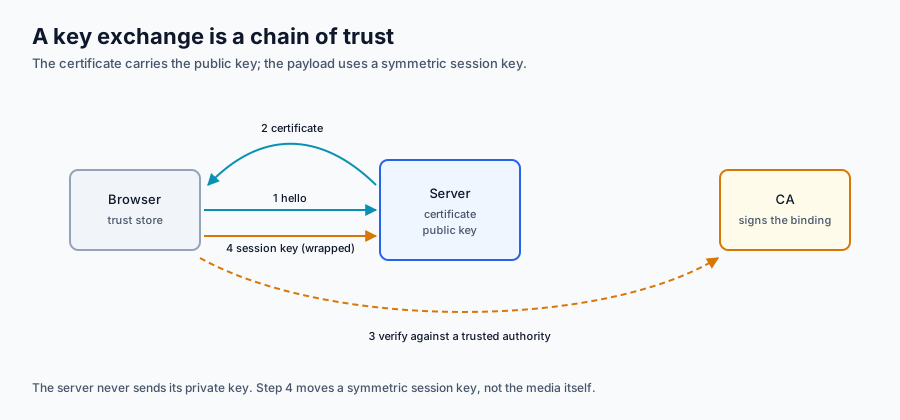
The scene shows a browser, a server and a certificate authority. Step through the exchange and watch which message is sent at each stage. The final step is where the fast session key begins — and the private key that makes the chain work is the same kind of secret you will hold in the lab, only at a different layer.
Step 1 · Client hello: the browser asks for a secure session; nothing secret has been sent.
The exchange in words. (1) The browser sends a hello. (2) The server returns its certificate, which contains its public key and the authority's signature. (3) The browser verifies the signature against a trusted authority. (4) The browser creates a session key, wraps it with the server's public key, and both sides use the session key for the payload. A static version of the same diagram is available if WebGL is unavailable.
The trust boundary on a media lifecycle
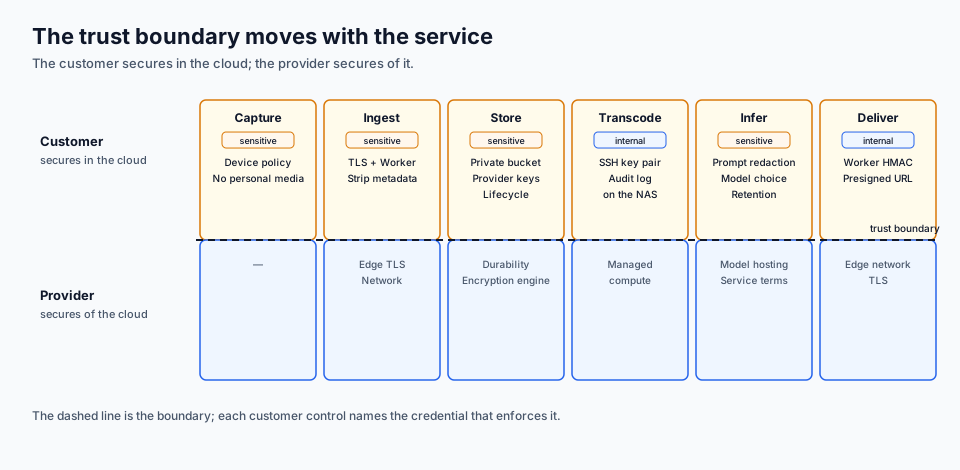
Figure 7.1 — The trust boundary moves with the service: the customer secures in the cloud, the provider secures of it, and a named credential enforces each customer control.
Reading the figure. The top band is the customer's side and each step names the credential that enforces it: device policy at capture, TLS and a Worker secret at ingest, a private bucket and a bucket-scoped R2 key at store, an SSH key on the NAS at transcode and backup, an OpenRouter API key at infer, and a Worker HMAC or presigned URL at deliver. The bottom band is the provider's side: network, hardware, the edge, provider-managed encryption at rest, managed compute, model hosting and service terms. The dashed line is the boundary; the data class crossing it is named at each step.
Step
Data class
Customer control
Credential
Provider control
Capture
Sensitive
Device policy, no personal media
None
None
Ingest
Sensitive
TLS, Worker validation, metadata stripped
SIGNING_KEY
Network, edge TLS
Store
Sensitive
Private bucket, scoped read
R2 API key pair, bucket-scoped
Encryption at rest, durability
Transcode and backup
Internal
Least-privilege access, logs
SSH key pair
Managed compute
Infer
Sensitive
Prompt redaction, model choice, retention
API key
Model hosting, provider terms
Deliver
Internal
Expiring capability
Worker HMAC, presigned URL
Edge network, TLS
Prerequisite: The Session 1 SSH key and DigitalOcean token, and a Cloudflare API token with the scopes the lab names. Set it up in Session 0: SSH keys, Accounts.
Lab — SSH keys, DigitalOcean and Cloudflare tokens and signed R2 access
Time: 120 minutes — 10 setup, 80 core, 20 evidence, 10 teardown. The Droplet and the two panel token creations are the long poles, so start them early. The presigned-URL proof needs a 60-second wait; do the register while it runs.
Prerequisite: the S1 account and SSH key, the S4 Worker sample and R2 subscription, and the lesson above. You need a terminal, a browser, and the doctl, wrangler, aws, jq and openssl command-line tools. The sample project lives at course/samples/s4-worker-catalogue/ in this repository.
You need to know: a credential is a scoped capability — scope, clock, custody, revocation and audit. Deleting a key from an account is not revoking it on a host. A presigned URL is a bearer capability until its expiry and cannot be revoked per URL. A Worker holds its signing key in a secret store that you cannot read back. The five credential classes are SSH key pair, DigitalOcean personal access token, Cloudflare API token, R2 API key pair and Worker secret; "token" unqualified is banned.
Safe-data acknowledgement: I have read the lab safe-data policy. I will use only the course-supplied synthetic media, I will keep every credential out of the repository, and I will not upload real personal media to any cloud service.
What you build
Piece
Name
What it is for
Credential inventory
data/credential-inventory.json
Every credential S1–S7 with scope, clock, custody, revocation and audit
Throwaway Droplet
course-<id>-s7
The host used to prove what SSH revocation actually means
SSH key pair
course-s7-rotate
A second, passphrase-protected key added to the host and then revoked
DigitalOcean token
course-s7-read
droplet:read + account:read; proves a denied delete
R2 bucket
course-s7-vault
Private; holds the catalogue and the signed file
R2 API key pair
course-s7-vault-read
Object Read, bucket-scoped; signs a 60-second URL
Worker
course-s7-capability
A copy of the S4 sample holding SIGNING_KEY
Cloudflare API token
course-s7-worker-editor
Workers Scripts → Edit, created with Individual Workers → course-s7-capability; rotates the secret, refused R2, but the Worker clause was not enforced
Register
data/register-template.json
Five residual-risk rows, R01–R05
Work in a scratch directory outside the repository so that node_modules and .dev.vars can never be committed:
S7_ID is a short identifier you invent (for example the last four digits of your student number). NAME is the Droplet's name; the tag on the Droplet uses the same identifier. The name is not a secret — it is how you find your own resources in a shared team.
1. Pre-flight: check the tools and the account
Console: DigitalOcean → Account → API shows your S1 token; Cloudflare → R2 → Overview shows the subscription S4 created. You do not need to change either one yet.
cd <path-to-repository>/course/weeks/07-security-identity
Start in this week's folder. Every relative path in the lab — remote.sh, data/, the sample — is resolved from here unless a step says otherwise.
doctl version
npx wrangler --version
aws --version
ssh -V
These four commands fail fast if a tool is missing or too old. doctl must be 2.4.0 or newer, Wrangler 4.69 or newer, the aws command-line tool v2 (the aws s3 presign spelling differs between v1 and v2), and OpenSSH anything from the last decade. None of them contacts a cloud service, so they cost nothing.
doctl account get
npx wrangler whoami
doctl account get proves your S1 token still works and prints the team you are spending from — check it is yours, not a classmate's. npx wrangler whoami prints the Cloudflare email and account id and lists the OAuth token's scopes; if it reports that you are not logged in, run npx wrangler login once and complete the browser flow. Copy the account id from this output into a variable so the S3 endpoint later resolves:
read waits for you to paste the account id and press Enter; the export publishes it to the tools. The account id is not a secret — it appears in every request URL — but keeping it in a variable stops typos in the endpoint.
Copy the sample into a scratch directory and install its dependencies. The install is the slowest step of setup; it runs while you read the rest of the section.
cp -R ../../samples/s4-worker-catalogue "$HOME/s7-capability"
cd "$HOME/s7-capability"
npm install
cp -R copies the S4 sample without its node_modules (the sample's .gitignore excludes them). npm install reads package.json and installs Wrangler and Vitest locally, so every later npx wrangler uses the pinned version rather than whatever is newest.
npm test
The sample ships eight behaviour tests. They run offline against a fake R2 binding and must all pass; if any fail, the copy is damaged or the Node version is wrong (Node 22.12 or newer). Fix that before spending money.
This rewrites the two identity lines of the sample's configuration: the Worker's name becomes course-s7-capability and its R2 binding points at the private vault you are about to create. The .bak suffix is the portable form of the in-place edit and leaves the original beside it. Read the result to confirm both lines changed:
grep -E '^(name|bucket_name)' wrangler.toml
2. Inventory the credentials you already hold
The first control is knowing what exists. This step finds credential-shaped strings in the repository and checks where the values actually live.
cd <path-to-repository>/course/weeks/07-security-identity
Return to this week's folder in the repository (the previous section left you in $HOME/s7-capability). The week folder holds the data files the notebook reads.
git grep -nE 'dop_v1_[A-Fa-f0-9]{32,}|(SIGNING_KEY|ACCESS_KEY|SECRET_ACCESS_KEY)[[:space:]]*=[[:space:]]*[A-Za-z0-9]{20,}' -- . ':!*.example' || echo "no credential material in tracked files"
git grep searches only files git tracks, matching two credential-shaped patterns: a DigitalOcean token-looking value, and an assignment of a long literal to a secret-named variable. The ':!*.example' excludes template files that are supposed to contain placeholder names. The || echo turns git's "no matches" exit status into a readable line; either way the evidence is the absence of a hit. A hit is not automatically a leak — SIGNING_KEY as a variable name is fine, a value is not — so read any hit before panicking.
ls -l "$HOME/Library/Application Support/doctl/config.yaml"
Print the permission bits and path of the file where doctl stored your S1 token. macOS puts it under ~/Library/Application Support/doctl/; on Linux the same file is ~/.config/doctl/config.yaml, so the Linux form is ls -l ~/.config/doctl/config.yaml. The first field must read -rw------- (600): only your user may read the token file. If it does not, chmod 600 it before going further.
doctl compute ssh-key list
List every SSH public key registered on the DigitalOcean team, with its id, fingerprint and name. This is the account's copy of the keys, and it is not where a Droplet decides who may log in — that is the distinction the next step drills. Note the id of the key you created in S1 (its name is usually course-s1-<id>); you will pass it to the Droplet.
Open data/credential-inventory.json and fill in the placeholders for your own account. Do not paste secret values into it: record where each value lives (file path, environment variable, secret store), never the value. The notebook validates this file in step 7.
3. SSH custody: the key delete that changes nothing
This is the centrepiece of the session. You create a throwaway host, add a second key, delete that key from the DigitalOcean account, and discover that login still works — because the account's key list is not the host's trust store.
export S1_KEY_ID=<s1-key-id>
Set the id of the key you created in S1 (doctl compute ssh-key list shows it). This is the provisioning decision for the host: the key is injected into authorized_keys once, at Droplet creation.
Console path: Droplets → Create Droplet, choose Rocky Linux 10, the SGP1 region, the s-1vcpu-1gb size, your S1 SSH key, and the tags course:42-05-0112, student:<id>, week:7.
The command creates one 1 GB Droplet in Singapore, installs your S1 public key into root's authorized_keys at boot, and waits for it to become active before printing the id. --ssh-keys "$S1_KEY_ID" is the only credential the host will trust; --tag-names makes the Droplet findable and is how teardown scripts know what belongs to the course. The $(...) captures the printed id into DROPLET_ID; tail -1 guards against a stray banner line.
export IP=$(doctl compute droplet get "$DROPLET_ID" --format PublicIPv4 --no-header)
Wait until the host is reachable and record its key. A Droplet reports active when the hypervisor has it scheduled, which is often twenty to sixty seconds before sshd accepts connections; ConnectTimeout and ConnectionAttempts make ssh retry instead of failing on the first refusal. StrictHostKeyChecking=accept-new records the host fingerprint on first contact instead of prompting, so every later ssh and scp trusts it. The remote command is just true: this step proves reachability, not the key you meant to test.
Copy this week's remote.sh to the host. It is the small script that performs the three authorized_keys operations the drill needs; keeping them in one reviewed file means every change to the host's trust store is a named, repeatable command rather than an ad-hoc edit you might mistype.
Run the script's identity action: hostname, user id, and the number of lines in authorized_keys. It proves you reached the host and are root, and one line means exactly one key is trusted. There is no password prompt; a key-only login is the evidence.
Print the key type and comment of each trusted line. The comment is the human label at the end of the public key — for the S1 key it is usually the key's name. This is your "before" picture; keep the output for the evidence bundle.
Now create the rotation key. It is a second key, not a replacement: the S1 key stays trusted throughout, which is what makes the revocation test meaningful.
ssh-keygen creates an ed25519 key pair at ~/.ssh/do_s7_rotate (private) and ~/.ssh/do_s7_rotate.pub (public). It asks for a passphrase: use one, because the point of this key is that its private half is protected in a way the S1 key may not be. The -C comment is how you will recognise the line later. The command refuses to overwrite an existing file — that is a safety feature, so delete the old pair deliberately if you are repeating the lab.
chmod 600 "$HOME/.ssh/do_s7_rotate"
chmod 600 makes the private key readable only by you. OpenSSH refuses to use a private key that is group- or world-readable, and a key file readable by other users on a shared laptop is a custody failure even if it never leaves the machine.
Print the key's fingerprint twice: the default SHA-256 form and the legacy MD5 form. Panels and older tools still show MD5, so an operator comparing fingerprints needs both. Record both in the evidence bundle; the fingerprint is how you prove which key a panel row refers to without copying the key itself.
Console path: Account → Security → SSH Keys → Add SSH Key, paste the .pub contents, name it course-s7-rotate.
Register the public key on the DigitalOcean account. This makes it available to future Droplets at creation time. It does not put the key on your running Droplet — a Droplet only reads its own authorized_keys, and nothing remotely edits that file for you. That gap is the whole lesson.
Append the new public key to the running host's authorized_keys, feeding it over stdin so the private key never leaves the laptop and the public key never lands in a repository. This is the step that actually grants access.
Log in with the new key. PreferredAuthentications=publickey forbids password fallback, so success proves the key itself was accepted, not some other mechanism. Keep this output: it is your "second key works" evidence.
Find the account-side id of the rotation key. The awk filter matches the second column (the name) and prints the first (the id); do not guess the id from another row.
It still works. The account delete removed the key from the menu of keys offered at Droplet creation; it did not reach into a running machine and delete a line from /root/.ssh/authorized_keys. Anyone who told you "we deleted the key, so the contractor is locked out" has not revoked anything on existing hosts. Capture this output — it is the most important screenshot of the lab.
Real revocation. Use the retained S1 key to remove every authorized_keys line carrying the rotation key's comment. That is the only operation that changes what the host will accept.
Retry the rotation key's login. BatchMode=yes stops ssh from prompting for a passphrase or password, so a failure is a clean Permission denied (publickey) and exit status 255. That denial is the success condition here: an expected failure, not a broken lab.
Log in with the retained S1 key to prove you did not lock yourself out. If this succeeds while the rotation key fails, the revocation was surgical: one key line removed, the other untouched. Write both outputs into the evidence bundle.
4. A read-only token and a named denial
Console path: Account → API → Tokens → Generate New Token. Give it the name course-s7-read, choose Custom Scopes, tick only droplet:read and account:read, set the expiration to 30 days, and copy the token once — the panel will not show it again.
read -rs DO_READ_TOKEN
Read the token into a variable without echoing it to the terminal (-s) or adding a newline (-r). Nothing is written to disk, so the token's only home is this shell; closing the terminal ends it.
export DIGITALOCEAN_ACCESS_TOKEN="$DO_READ_TOKEN"
doctl reads DIGITALOCEAN_ACCESS_TOKEN before it reads the config file, so this export switches the CLI from your broad S1 token to the read-only one for the rest of the shell. The config file is untouched, which is why you can switch back with unset later.
doctl account get
The account read succeeds because the token carries account:read. Seeing the team name here is not a failure — a read-only token is supposed to be able to look.
This must be refused with HTTP 403 and a non-zero exit status. The token can read droplets and cannot delete them, because DigitalOcean scopes are per action: droplet:read does not imply droplet:delete. The error body names the missing scope and contains no secret, so it is safe to screenshot. Do not "fix" the denial by minting a droplet:* token; if a job needs a delete, mint a token that can delete only what that job names.
echo "delete exit=$?"
Print the exit status immediately — $? is overwritten by the next command, so it only means anything on this line. A non-zero value here, right after a 403, is your proof that the CLI treated the denial as failure.
doctl compute droplet list --format ID,Name
List the droplets with the read-only token to show the Droplet is still there. The denial changed nothing.
unset DIGITALOCEAN_ACCESS_TOKEN
Drop the read-only token from the environment so the next doctl call uses your S1 token from the config again. Also unset DO_READ_TOKEN when you have finished capturing evidence.
5. A private bucket and a 60-second capability
The bucket is private from the start: no custom domain, no r2.dev toggle, no public URL. Access happens only through a credential you scope to this one bucket.
npx wrangler r2 bucket create course-s7-vault
Console path: R2 → Create bucket, name course-s7-vault, leave the public-access options off.
Create the bucket. R2 needs the subscription checkout from S4; if the command reports that R2 is not enabled, complete that checkout in the panel first.
npx wrangler r2 object put course-s7-vault/catalogue.json --file data/catalogue.json --remote
npx wrangler r2 object put course-s7-vault/files/asset-0001.txt --file data/files/asset-0001.txt --remote --content-type text/plain
Upload the two objects the Worker needs: the catalogue index and the one synthetic asset file. --remote means the real bucket, not Wrangler's local emulation; --content-type sets the type the Worker will serve back. Both files are course-authored synthetic data — no client footage.
Console path: R2 → course-s7-vault → Create R2 API Token. Choose Object Read, and under Specify bucket pick course-s7-vault only. Copy the access key id and secret access key. This pair is the fourth credential class: it is not a Cloudflare API token and cannot manage the account; it can only read objects in that one bucket.
The aws CLI speaks S3's signature protocol, and R2 implements it. These three exports point the CLI at the key pair and at R2's expected auto region. The values live only in this shell.
head-object fetches the object's metadata without the body. Success proves the bucket-scoped key can read exactly this bucket, and prints the size, ETag and content type you can compare with the upload.
Create a presigned GET URL valid for 60 seconds. Presigning is a local computation: the CLI signs the request with the secret key and never calls R2. That is why the signing key can produce a URL for an operation it would be denied at use time — the denial happens when the URL is fetched, not when it is made. --expires-in 60 is the control; aws s3 presign produces GET only.
Fetch the URL immediately. -o /dev/null discards the body, -w prints only the HTTP status. Expect before: 200: the signature is valid and the clock has not run out.
sleep 61
Wait past the expiry. The extra second avoids a boundary race: the URL expires at whole-second granularity.
The same URL, after expiry. Expect after: 403. Nothing about the object changed and the bucket is still private; only the clock passed. Note what you cannot do: there is no per-URL revocation. Deleting a URL somebody already holds is impossible, which is why a short TTL is the only control you actually have.
6. Rotate a Worker secret under a one-Worker token
Console path: Workers & Pages → Create → Worker shows the S4 sample you are copying. You do not create it here; you deploy the copy with Wrangler, then use a narrowly scoped token to rotate its secret.
OLD_KEY=$(openssl rand -hex 32)
Generate 32 random bytes as 64 hex characters. This is the Worker's HMAC key for the first signature; $(...) captures it into a shell variable so it is never printed to the terminal or written to a file.
printf '%s' "$OLD_KEY" | npx wrangler secret put SIGNING_KEY
Store the value as a Worker secret. printf avoids the trailing newline that echo would add — a newline would become part of the key and make every signature wrong. secret put encrypts the value into the Worker's secret store, creates a new version, and deploys it immediately. You cannot read the value back; wrangler secret list shows names only.
sleep 5
Wait five seconds. A secret change propagates across Cloudflare's edge in a few seconds; calling the Worker in the same instant can still hit an instance holding the previous version, which looks like a bad signature. The wait makes the next check deterministic.
Deploy the Worker and capture its workers.dev hostname. 2>&1 merges Wrangler's output into the pipe, tee keeps a log, and the grep extracts the first https://….workers.dev URL. The Worker is public at that hostname, which is why its only access control is the signature on /asset/:id/file — the catalogue and health routes are deliberately readable.
sleep 5
Give the deployment the same few seconds to reach the edge before the health check.
curl -s "$WORKER_HOST/health"
Read the health route. It must report "ok":true and a non-zero asset count, which proves the R2 binding points at the bucket you filled and the catalogue parsed.
Mint a signed URL for asset-0001 using the old key. The script computes an HMAC over the asset id and the expiry, exactly as the Worker verifies it. SIGNING_KEY= on the command line sets the variable for this one process only.
Expect 200: the URL and the Worker share the same secret.
Console path: Manage Account → Account API Tokens → Create Token → Custom token. Permissions: Account → Workers Scripts → Edit. Resources: Include → Individual Workers → course-s7-capability. Set a short expiry and copy the token.
read -rs CF_WORKER_TOKEN
Read the token and your account id. The account id is not a secret (wrangler whoami prints it), but keeping it in a variable makes the later API call readable.
export CLOUDFLARE_API_TOKEN="$CF_WORKER_TOKEN"
wrangler prefers CLOUDFLARE_API_TOKEN over its stored OAuth login, so every command now acts as the scoped token. This is the operating credential: one Worker, secret rotation only. The broad OAuth login you used to deploy is the provisioning credential, and it could do anything in the account.
NEW_KEY=$(openssl rand -hex 32)
Generate the replacement key.
printf '%s' "$NEW_KEY" | npx wrangler secret put SIGNING_KEY
Rotate the secret with the one-Worker token. This succeeds because the token is Editor on this Worker.
sleep 5
The same propagation wait as before, so the next check cannot be a stale instance.
npx wrangler versions list
List the Worker's recent versions. Each secret put created a version; this list is the change record, and it is more reliable than trying to find the event in another system. Note that an older version still contains the older secret value — rolling back to it can resurrect a key you thought you had rotated out.
The URL signed with the old key must now return 401. Rotation is effective immediately for new requests: the Worker verifies against the new secret, and the old signature no longer matches.
Expect 200. Old 401 and new 200 together are the rotation proof.
npx wrangler secret list
List the secret names under the scoped token. It prints SIGNING_KEY and no value, which is the point: the operator can rotate without ever reading the secret.
Ask the Workers token to list R2 buckets. This must return 403. The token carries one permission family — Workers Scripts — so an R2 call is outside its scope and refused. That is the Cloudflare half of the blast-radius proof: a leaked token can rotate secrets on Workers and cannot touch the bucket that holds the media. If this returns 200, your token is broader than this lab's contract; delete it and recreate it with only Workers Scripts → Edit.
Read the secret names of a different Worker with the same token. Record the status; do not assume. On the verified run for this course (2026-11-13) this returned 200 even though the token was created with Individual Workers → course-s7-capability: the resource clause did not narrow the Workers Scripts permission, and script creation was not stopped either. A scope is only real when the API enforces it — the label on the token is a claim, not a boundary. If your account has no second Worker, skip this check and cite the instructor's result in your register reasoning. Either way, the answer belongs in R02: the blast radius is what the API allows, not what the panel said.
The finding. The design for this lab assumed a per-Worker token would be denied operations on other Workers. The API does not enforce that on this account: the token listed and wrote another Worker's secrets. Treat the token as a Workers-wide credential and record the true blast radius — that is exactly the judgement the register exists to capture.
7. Read both audit surfaces
Console path: Manage Account → Audit Logs, filter to the last hour and look for R2 bucket create/delete, token administration and Worker events. Console path: DigitalOcean → Settings → Security → Security History, look for token and Droplet events.
npx wrangler versions list
Re-read the versions list as the audit record of the rotation. Cloudflare Audit Logs document administrative events and record R2 bucket operations; token and secret events are likely present but are not enumerated in the documentation, so the lab does not claim them. Object access is not in Audit Logs at all.
Capture, for the evidence bundle:
a Cloudflare Audit Logs extract covering the last hour, with account ids and email addresses cropped;
a DigitalOcean Security History screenshot covering the token creation, the Droplet creation and the denied delete attempt (the denial is a failed event and may or may not be listed — record what you actually see, not what you expect);
one line of the wrangler versions list output showing the version created by the second secret put.
Write down the gap for each credential in the inventory: what the provider records automatically, and what you have to capture yourself because nothing does it for you.
8. Complete the credential inventory and the register
cd <path-to-repository>/course/weeks/07-security-identity
Return to the week folder so the notebook and the data files resolve.
Open data/credential-inventory.json and replace every <placeholder> with what your own panels and machine show: your student id, the date, the expiry you actually set on the Cloudflare token, and the scopes your S1 token really carries. Keep secrets out of it — record the location, never the value.
Open data/register-template.json and revise R03–R05 for your own deployment; keep R01 and R02 as the worked examples unless your situation differs. Each row needs a likelihood and impact (1–5), the existing control, a residual likelihood and impact, one clause of reasoning, a treatment and an owner.
Open notebook.ipynb and run all cells. It validates the inventory schema, models the presign cases, walks the scope matrix, steps the secret state machine and scores the register, and writes security_results.json. Every assertion must pass; a failure tells you which data row is wrong, and the fix is in the data, not in the notebook.
uv run python data/check-notebook.py
Run the same cells without a Jupyter kernel. Use this over SSH or when you want the assertions in your terminal; it executes the notebook top to bottom and stops at the first failure, and it is the check the reference runner uses. It must end with notebook: all code cells passed.
Write a 150–250 word what this proves note: what the account-key delete changed and did not change; why the presigned URL was reusable and unrevokable; why the old Worker URL stopped working at once; and which two residual risks you would defend to the unit, with one sentence each on why.
Evidence bundle
Submit these ten items. Each is scored 3/2/1/0 against the rubric in PLO.md.
The completed credential-inventory.json and the pre-lab worksheet (the four questions answered for each credential: what can it reach, when does it stop, where does it live, what proves use).
The S1 and rotation key fingerprints in SHA-256 and MD5; list-authorized before and after; the still-working login after the account delete; the denied login after the authorized_keys removal; the retained S1 key's successful login.
The course-s7-read scope page with the token value redacted and the expiry visible, plus the 403 and exit status from the denied delete.
The private bucket's settings page, the bucket-scoped R2 key page, and the presign 200/403 with timestamps.
wrangler secret list; wrangler versions list before and after rotation; the old URL's 401 and the new URL's 200; the R2 call refused with 403; and the other-Worker secrets check with whatever status it actually returned.
The Cloudflare token page showing the permission and the resource clause, plus one sentence on whether the API enforced that clause.
The Cloudflare Audit Logs extract and the DigitalOcean Security History screenshot, with identifiers redacted.
The completed five-row register and the 200-word justification of the top two residual risks.
security_results.json and your command history for the session (a script capture or your terminal scrollback), with every token, account id and email removed before submission.
The teardown log, doctl balance get, and the 150–250 word note.
Failure and recovery
The deliberate failures are the two denials and the expiry: the read-only token's delete returns 403, the URL returns 403 after 60 seconds, and the removed SSH key returns Permission denied. They are expected outputs; capture them.
The failure that catches people is the missing denial. If the read-only token can delete the Droplet, its scopes are wrong — delete the token and recreate it with only droplet:read and account:read, do not proceed. If the URL still returns 200 after 61 seconds, check the system clock and whether the URL was minted with a different --expires-in.
If ssh with the rotation key is denied before you removed any line, the append-key step did not run or the key file is not the one in authorized_keys: list the lines and compare the fingerprint. If you lock yourself out entirely, use the DigitalOcean web console, which authenticates through the panel rather than SSH; Rocky Linux has no root password reset, so the console is the only fallback.
If wrangler secret put returns an authentication error, check wrangler whoami — the scoped token may not include the Worker, or CLOUDFLARE_ACCOUNT_ID may be wrong. If the Worker deploys but /health reports 503, the R2 binding names a bucket that does not exist or the catalogue object is missing.
Cost ceiling
$0.03. One s-1vcpu-1gb Droplet at $0.00893/hour with a one-hour minimum charge is about one cent; deleting and recreating it a couple of times stays under three cents. R2 (under 10 GB, free egress), Workers (under 100,000 requests/day) and the Cloudflare API are free on their free plans. There is no DNS change and no custom domain. Check doctl balance get at teardown.
Teardown
unset CLOUDFLARE_API_TOKEN CLOUDFLARE_ACCOUNT_ID
Drop the scoped token so the Worker deletion runs as your OAuth login — the provisioning credential is the right one for deleting what it created.
npx wrangler delete course-s7-capability
Delete the Worker. Its secrets go with it; this is the real revocation of SIGNING_KEY.
Empty the bucket. bucket delete refuses a non-empty bucket, so these two commands are not optional.
npx wrangler r2 bucket delete course-s7-vault
Delete the bucket itself.
Console: delete the R2 API token course-s7-vault-read, the Cloudflare token course-s7-worker-editor, and the DigitalOcean token course-s7-read. These have no CLI/API deletion path in the student stack; the panel is the only route. Confirm the token lists no longer show them.
Delete the Droplet. The rotation key is already gone from the account (the drill deleted it) and from the host (the drill removed its line); the S1 key stays.
doctl compute droplet list --format ID,Name,Region,Status
Confirm no course Droplet is left running. An empty table is the teardown proof.
doctl balance get
Read the balance and compare it with the pre-lab figure. A charge above three cents means something survived teardown or was created twice.
Remove the local copy of the sample and the rotation key pair. The private key is worthless now that its authorized_keys line is gone, but a private key on disk is still a custody liability. Leave the S1 key alone.
Record every deletion and the balance in the teardown log.
Fallback
No R2 subscription. Use the instructor's bucket and a student-created bucket-scoped key. Skip bucket creation; the presign proof and everything else is unchanged. A fallback that changes the evidence shape is a defect — say in your note that bucket creation was omitted and why.
No DigitalOcean account. Use the instructor account slot. The Droplet and the token proofs are unchanged; the tag must carry your own id.
SSH blocked by the network. Use the DigitalOcean web console for the login checks and the remote.sh commands; the evidence is the console screenshot instead of the terminal output, and the note says so.
Wrangler blocked. Use the dashboard to deploy the sample and put the secret, and do the denied-create proof with the API call through curl — it needs no Node.
Cloudflare account blocked. Use the instructor account; the Worker and the bucket are named with your id.
Notebook
Open the lab notebook; it validates the credential inventory, models the presigned-URL decisions, walks the scope matrix, steps the secret state machine and scores the five-row register before you submit. It runs offline on the Python 3.14 standard library, reads this week's data/ files, and writes security_results.json.
Downloads for this session
Each document name opens a rendered view you can read in the browser. The download link beside it gives you the raw Markdown working file: the copy you edit, run and submit. The page above and the lab steps carry the teaching.
The runnable notebook that produces the lab's numbers.
Research question
Where exactly does the provider's responsibility end for a media asset that is stored in DigitalOcean, cached by Cloudflare, and processed by an OpenRouter-routed model?
Submit an 800–1,200 word answer with 5–8 sources at the next session. The rubric and the exemplar guidance show the expected shape.
References — Session 7
Ristenpart, T., Tromer, E., Shacham, H., & Savage, S. (2009). Hey, you, get off of my cloud: Exploring information leakage in third-party compute clouds. Proceedings of CCS '09, 199–212. https://doi.org/10.1145/1653662.1653687
The canonical demonstration that multi-tenancy creates side channels, which is why shared responsibility is an analysis rather than a slogan. GPU multi-tenancy and accelerator side channels are a newer, less settled version of the same problem. No essential figure; the attack diagram can be redrawn.
Fernandes, D. A. B., Soares, L. F. B., Gomes, J. V., Freire, M. M., & Inácio, P. R. M. (2014). Security issues in cloud environments: A survey. International Journal of Information Security, 13, 113–170. https://doi.org/10.1007/s10207-013-0208-7
A threat taxonomy that gives the risk register a checklist instead of a list of anecdotes. Media-specific threats — deepfakes, provenance and rights metadata — are largely outside the taxonomy. Taxonomy tables can be rebuilt.
Shamir, A. (1979). How to share a secret. Communications of the ACM, 22(11), 612–613. https://doi.org/10.1145/359168.359176
The threshold-secret idea underneath key management and recovery, which makes the KMS exercise more than a console tour. Threshold schemes in managed KMS products are opaque, so comparing their guarantees is a useful student project. No figure; the polynomial example is a whiteboard derivation.
Teaching note. Narrate Ristenpart et al. (2009) for 5–8 minutes, assign the abstract of Fernandes et al. (2014) as reading, and close by restating the open problem as the weekly question. Figures are third-party; redraw by default.
PLO — Session 7: Security and identity
CLO: By the end of this session, the student can inventory and classify the course's credentials, scope each to the smallest action and resource the platform allows, prove a denied action and an expiring capability, rotate a secret, and defend five residual-risk judgements with audit evidence.
PLO
Role
Research answer
Lab evidence
Points
Evidence
Rubric
PLO3
primary
4
3
7
An 800–1,200-word trust-boundary analysis with 5–8 sources; the credential inventory, the denied-action proof, the presigned-URL expiry, the rotated Worker secret, the audit events, the five-row register and justification
Research 4/3/2/1; Lab 3/2/1/0
PLO2
secondary
0
0
0
Lecture context only; not scored
—
Total
4
3
7
Total: 7 points
Four-level descriptors
Research (4/3/2/1). 4 = one concrete asset path traced through capture, storage, edge and inference, with the provider control, customer control and data class named at each step, the shared-responsibility model and PDPA cross-border rule cited, and a residual-risk judgement; a weak counterargument is addressed. 3 = a sound trace with most controls and a judgement, one step thin or the counterargument missing. 2 = recites the shared-responsibility slogan without choosing an asset or a boundary. 1 = a summary with fewer than five sources. 0 = nothing submitted or misconduct.
Lab (3/2/1/0). 3 = the read-only token is denied delete, the presigned URL works then expires, the Worker secret rotates under a single-Worker token, the audit events are recorded, the five-row register is valid and the top risks are justified, and teardown and cost are respected. 2 = mostly complete, one check thin. 1 = partial controls or an incomplete register/teardown. 0 = nothing submitted, unsafe data, or no teardown.
The full course arithmetic is in production/baseline.md; this file is the weekly instance.