Lab: TCO, the move, and the portability scorecard. PLO: PLO1 / PLO3. Points: 7.
Overview
The monthly bill meets the client list. The unit publishes forty finished videos a month, keeps a catalogue of 6,000 assets and serves about 300 views a day — and pays roughly $80 a month for the cloud that holds and delivers it. The one big idea for this session: a cloud bill is a model, and vendor lock-in is a cost you can put in that model. Once the bill is a model, you can change its inputs — a tier, a snapshot, a second provider — and see what happens before you commit.
The unit no longer runs on one provider. It runs on three: DigitalOcean for the Droplet and the block volume, Cloudflare for the edge cache and object storage, and OpenRouter for model inference. Three providers mean three bills, three identities and three sets of prices. That is the setting for the session's harder question: what would it cost to leave, and which layer would be hard to move?
The session has two halves. The first rebuilds the unit's total cost of ownership from usage and public prices. The second moves the catalogue service to an independent provider, Linode/Akamai, and asks what made the move hard. Portability is not a slogan; it is an exit cost with a number.
Lesson
Why a bill is a model
A cloud bill looks like a receipt, but it is really a calculation. Every line is usage × unit price, and both sides are things you can inspect. The unit's bill has five lines, and for this unit they carry almost all of the cost:
Line
What drives it
Rounded teaching figure
Storage
1.2 TB kept: a 1 TB video archive, a 200 GB asset library and about 300 GB of snapshots
$25
Compute and CDN
One small Droplet running the catalogue service, plus the Worker at the edge
About 135 GB/month: 300 views a day × 15 MB × 30 days
$15
Inference
About 500,000 tokens/month for captions and tags
$5
Buffer
Retries, request charges and price drift
$10
These five rounded numbers are the scenario spine's teaching figure, not a quote. A model is useful precisely because it is inspectable: when the lab replaces each rounded line with usage times a current public price, you can see which line a rounded number hid and which line moved first.
The buffer deserves a note because students often drop it. Real bills contain charges nobody planned: retries, request counts, a forgotten snapshot, a tier minimum. A buffer is not padding; it is the line that admits the model is incomplete.
Where media money goes
Storage and egress behave in opposite ways. Storage is cheap per gigabyte and expensive in total, because media is large and is kept. Egress is cheap per gigabyte and expensive in total, because it repeats: 135 GB a month is about 1.6 TB a year, and it does not stop when the project ends.
Data gravity is why the archive cannot simply move. The larger a dataset, the more expensive it is to relocate, and the more processing and people grow around it. Two levers act on the bill without changing provider. Tiering moves cold bytes to cheaper storage: a 1 TB archive does not need the same tier as the 200 GB library the unit reads every day. A snapshot is a point-in-time copy kept for recovery; useful, and billed like storage, so a snapshot policy is a cost decision too. A cache cuts origin egress without touching the catalogue.
A tier is not a discount. It is a contract about how often the data may be read and how fast it comes back. Infrequent-access tiers are cheaper per gigabyte because retrieval is rarer, sometimes metered, and sometimes subject to a minimum storage duration. The lab's archive-trap drill exists to make that contract visible: the same 1 TB is about $100 a month on block storage and about $10 a month in an infrequent-access object tier.
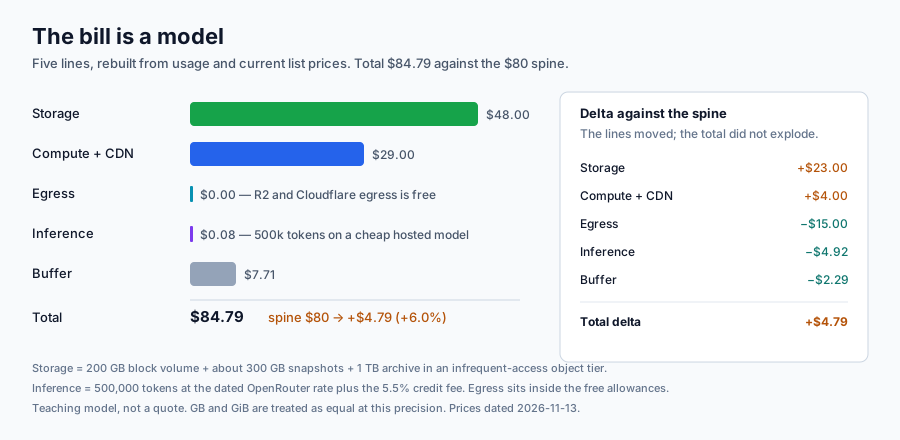
Figure 6.1 — The bill is a model: five cost lines rebuild to $84.79 against the $80 spine, and the side panel shows that the lines moved rather than the story changed.
Reading the figure. The bars are the lab's rebuilt lines, not the rounded spine. Storage is now the largest line at about $48 because it is split into three parts: a 200 GB block volume, about 300 GB of snapshots and a 1 TB archive in an infrequent-access object tier. Compute and CDN is about $29: the Droplet plus the Worker. Egress is a sliver at $0, because the edge's egress is free and the Droplet's transfer is inside its allowance. Inference is about $0.08 — 500,000 tokens on a cheap hosted model is genuinely small at this scale. The buffer adds 10%, and the total lands at about $85, roughly 6% above the spine. The side panel decomposes that gap: storage is up about $23, compute is up about $4, egress is down about $15, inference is down about $5, and the buffer is down about $2. The lines moved; the total did not explode. That is what a model is for.
Pricing is a menu, not a number
Providers publish several prices for the same service: on-demand, committed use (a one- or three-year promise in exchange for a discount), free tiers, and graduated volume prices. A committed-use discount is cheaper per hour and a stronger lock, because the promise survives a change of mind. A free tier is cheapest of all, and it ends.
So the useful comparison is not "which provider is cheaper" in general. It is "which price applies to this usage, at this volume, with this commitment — and what does the commitment cost if the plan changes?" A price that is only valid for three years is a different product from a price that is valid today.
Lock-in has dimensions to price
The standard account separates technical, data and organisational lock-in. Technical lock-in is a proprietary API, runtime or identity model. Data lock-in is the cost of moving the archive and its schema. Organisational lock-in is the training, process and contract that make leaving disruptive even when the technology is portable.
Those three are hard to compare across providers, so the lab scores five observable dimensions on a 1–5 scale, where 5 means easy to leave:
Dimension
Question
What a low score looks like
Egress price
What does it cost to send the archive out?
A high per-GB price with no free allowance
Managed-service equivalent
Does the second provider sell the same abstraction?
A service with no close equivalent
Identity model
Can the same principals and policies be expressed?
A different identity system with no mapping
Data-transfer effort
How much work moves the data?
A proprietary schema and a large archive
Exit cost
What does a migration cost in money and days?
Weeks of re-platforming and a large transfer bill
A weighted score turns the five rows into one number the unit can track each quarter. The weights are the argument. If identity is weighted at 0.30, the unit is saying that a second control plane is the main obstacle. If egress is weighted at 0.15, it is saying that free egress matters less than the days the move takes. Two reasonable people can disagree about the weights, and that disagreement is the useful part: it names what the unit actually values. The lab sets a threshold of 60 — below it, the exit option is weak enough that the unit should act.
Portability by layer
The most useful idea in this session is that a stack is not uniformly locked in. It is a set of layers, and each layer has its own portability:
Layer
Interface
Portable?
Data
The S3 API
Yes, at the object level; block volumes are a filesystem copy
Model
An OpenAI-compatible API
Yes, with output differences that need re-testing
Compute
A container image
Mostly: it runs on an instance anywhere that runs containers
Edge
A provider's worker runtime
No: there is no standard worker interface
Identity
A provider's token and role model
No: principals and policies do not map one-to-one
This is why a bill can look portable while the stack is not. The bytes may leave for free, the model call may switch endpoints with one environment variable, and the container may run unchanged on a second provider — and the unit can still be stuck, because the Worker, the DNS zone and the three token systems do not move with them. The lab's scorecard puts 0.30 of the weight on identity for exactly this reason.
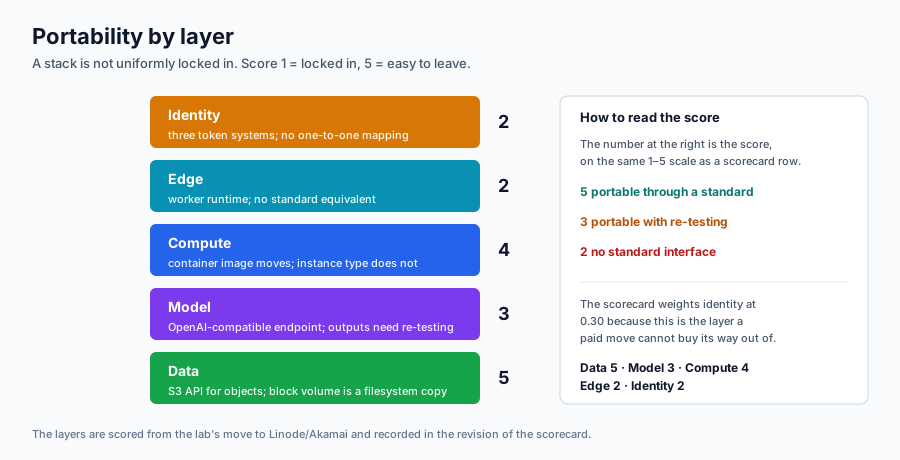
The second figure separates the layers explicitly. Its point is not that one provider is bad. It is that "vendor lock-in" is too coarse a word to act on: the unit should be able to say which layer is expensive to leave, and price that layer separately.
Figure 6.2 — Portability by layer: data and model move through standard interfaces, compute mostly moves, edge and identity do not.
Reading the figure. The layer at the bottom is data, scored 5: objects move through the S3 API and R2 charges nothing to send them out. Above it the model layer scores 3: an OpenAI-compatible endpoint is portable in shape, but prompts, output formats and prices still need re-testing. Compute scores 4: a container image is the portable artifact, while the instance type and its sizing are not. The top two layers score 2. The Worker has no standard equivalent on the second provider, and identity is three separate token systems with no one-to-one mapping. The number beside each layer is the same kind of score as the scorecard row, applied per layer instead of per dimension.
What leaving costs
An exit cost has three parts: the bytes (archive size × egress price), the re-platforming days (services to replace, identity to remap, tests to rerun) and the option value of the time. On this stack the bytes are close to free, because R2 and Cloudflare egress are free and the Droplet's transfer allowance covers the audience. Six re-platforming days cost far more. The bytes are rarely the expensive part; the services are.
The lab's exit runbook is the artifact that makes this operational. A runbook is not a wish list. It maps each service in the current stack to its replacement, orders the steps so the service stays available, estimates the days, and names the exit cost. The migration order matters: copy the data first and verify checksums, stand up the replacement service beside the old one, switch traffic, then remove the old resources. Doing it in the other order is how units lose a week.
Inference adds a newer wrinkle. A hosted model is called through an API, so the call is portable. The price is not: token prices change, the cheap model changes, and the provider adds a credit-purchase fee. The lab makes one live, priced call and reads the provider's own generation record, so the inference line is a measured number rather than a scraped one.
When lock-in is the right answer
Lock-in is not a defect to eliminate. A managed service buys operations the unit would otherwise do, and a committed-use discount buys a lower price with a promise. The question is whether the value bought is larger than the exit cost it creates, and whether the unit has a threshold at which it will act.
A workable rule: accept lock-in where the managed value is high and the data is small; resist it where the data is large, the switching cost is hidden, or the provider's roadmap becomes the unit's roadmap. A three-provider stack is not automatically more portable than a one-provider stack. It is portable in the data and model layers, and it adds identity surfaces — which is why the move in this lab is scored, not celebrated.
Check yourself
Why does the storage line grow with the archive while the egress line grows with the audience?
Which is cheaper: a 20% committed-use discount on compute, or moving 1 TB of archive to an infrequent-access tier? What does each one give up?
Which of the three lock-in dimensions is hardest to measure, and why?
The lab's portability score is exactly 60 against a threshold of 60. What would you change first to move it, and what would that change cost?
A container image is portable; an instance type is not. Why does that distinction matter for the re-platforming days?
Prerequisite: A Linode/Akamai account with a payment method, two-factor authentication and a per-service token, plus the DigitalOcean, Cloudflare and OpenRouter accounts. Set it up in Session 0: Accounts.
Lab — TCO, the move, and the portability scorecard
Time: 120 minutes — 10 setup, 10 audit, 10 OpenRouter, 30 Linode move, 15 TCO, 15 scorecard and runbook (80 core), 20 evidence, 10 teardown. The Linode instance takes two to three minutes to boot, so start it early and audit while it warms up.
Prerequisite: the S1 DigitalOcean account and scoped token, the S4 Cloudflare account and R2 buckets, and the S5 catalogue Droplet. The fourth account — Linode/Akamai — is a pre-course task: create it, add a payment method, enable 2FA and make a per-service token with about 90 days of life. Install the CLIs if you have not already: linode-cli, doctl, aws and jq.
You need to know: usage × unit price is a cost line, and a total is the sum of the lines plus a buffer. A portability score is a weighted average of five 1–5 scores, where 5 means easy to leave. A tier is a storage contract about how often data is read, not just a price.
Safe-data acknowledgement: I have read the lab safe-data policy. I will use only the course-supplied synthetic media and will not upload real personal media to any cloud service. I will redact account IDs, emails and every token value from screenshots and logs.
Task
Build a monthly total cost of ownership for the campus media unit on the DigitalOcean + Cloudflare + OpenRouter stack, audit the real bill, make one live priced inference call, move the catalogue service to Linode/Akamai, rebuild the TCO against the $80 spine, score the move on five portability dimensions, and write an exit runbook.
What you will build
Piece
Name
What it proves
OpenRouter account and key
student-owned, key course-s6-<id>
One real priced call and a metered cost
DigitalOcean audit
results/do-*.json
The bill you actually have, not a quoted price
Cloudflare audit
results/cf-token.json, dashboard screenshots
The free tiers your bill relies on
Linode instance
course-<id>-s6
A second independent compute provider
Block volume
course-<id>-s6-vol
A 30 GiB filesystem attached to the instance
Object Storage
course-<id>-s6 bucket
The S3 API as the portable data layer
Firewall
course-<id>-s6-fw
Least privilege on a second control plane
Container
course-s6-catalogue:lab
The portable compute artifact
Notebook
tco_results.json
The five-line model, the tier drill and the scorecard
Runbook
exit-runbook.md
Exit cost in bytes, days and dollars
Run every command from the repository root unless a step says otherwise. Keep a results/ directory: it is the evidence bundle.
Steps
1. Set up and check the guardrails
Create the evidence directory first. Everything you collect lands here, and the teardown proof is the last thing that does.
mkdir -p results
Now confirm that all four accounts answer. The Linode command prints your account and balance; if it says Invalid Token, the token was copied incompletely or has expired.
List the regions and the Object Storage endpoints. You are looking for sg-sin-2 and the sg-sin-1.linodeobjects.com endpoint. Do not use ap-south: it is the legacy Singapore region, marked limited availability, and it serves a different endpoint.
linode-cli regions list --format id,label --text --no-headers
Confirm the DigitalOcean side. doctl account get proves the scoped token works; it does not create anything. The audit in Step 3 is read-only.
doctl account get --format Status,DropletLimit
doctl balance get
Panel path. Linode: Account → Settings shows the balance and the credit expiry. DigitalOcean: Billing shows the balance and the month-to-date spend.
2. Create the OpenRouter account and make one priced call
Panel path, no CLI equivalent. Sign up at https://openrouter.ai, enable 2FA, and add $1–2 of credit. Open Keys → Create Key, label it course-s6-<id>, and copy it once. The account stays for Session 8; the key is revoked at teardown. Record the top-up receipt as evidence — it is the only place the 5.5% credit-purchase fee appears.
Put the key in the environment for this shell only. Never commit it, and clear your shell history if you paste it on a command line.
export OPENROUTER_API_KEY="<openrouter-key>"
Read the balance. The response nests a data object with total_credits and total_usage; the difference is what you can spend.
Make one call. max_tokens is deliberately small: this is a priced experiment, not a captioning job. Capture the whole response, because the id is how you ask for the bill.
RESP=$(curl -s https://openrouter.ai/api/v1/chat/completions -H "Authorization: Bearer $OPENROUTER_API_KEY" -H "Content-Type: application/json" -d '{"model": "openai/gpt-4.1-nano", "messages": [{"role": "user", "content": "Caption a campus media unit thumbnail."}], "max_tokens": 64}')
echo "$RESP" | jq '{id, model, usage}' | tee results/openrouter-call.json
Ask the provider for its own record of that generation. The usage object in the completion is the provider's estimate; /generation is the metered record, and it can take a second or two to appear. If it returns 404, wait and retry — do not make a second call.
What to look for.tokens_prompt, tokens_completion and total_cost. Divide total_cost by the token count and compare it with the list price; the small difference is the 5.5% credit fee with its $0.80 minimum spread across purchases.
3. Audit the real DigitalOcean and Cloudflare bill
This step creates nothing. You are reading what the previous labs already built, so the audit is the unit's actual bill rather than a pricing page.
List the Droplets, volumes and snapshots and save the JSON. These files are the inventory of what would have to move.
doctl compute droplet list -o json > results/do-droplets.json
doctl compute volume list -o json > results/do-volumes.json
doctl compute snapshot list -o json > results/do-snapshots.json
Record the month-to-date balance. Do not print the account email: this file goes into your evidence bundle.
doctl balance get --format MonthToDateBalance,AccountBalance | tee results/do-balance.txt
Verify the Cloudflare token by reading the accounts it can see. A token scoped to R2 and Workers may not have the token-verification endpoint, so the account list is the reliable proof. Then list the R2 buckets; that call needs Account:R2:Read, and a token that can deploy a Worker but not read R2 is a scoping lesson from Session 7.
Panel path, no CLI substitute for the metrics. Cloudflare dashboard → R2 → Metrics for storage and operations; Workers & Pages → Metrics for request counts; Billing → Usage for the month. Save three screenshots with the account ID covered. The R2 free tier is 10 GB and free egress; the Workers free tier is 100,000 requests a day. The audit exists to show that the model's $0 egress line is a real allowance, not an assumption.
If your API audit worked, copy the usage template and fill in your measured values with "source": "live". If it did not, leave usage.json absent; the notebook records that the run used the synthetic sample.
4. Create the Linode instance, block volume and firewall
Panel path.Linodes → Create Linode offers the same choices: region Singapore 2, image Debian 12, plan Linode 2 GB. The CLI is faster and leaves a trace.
Set the identifiers once. The <student-id> is a short alias, not your account number or email.
export STUDENT_ID="<student-id>"
export LINODE_REGION="sg-sin-2"
export LINODE_IMAGE="linode/debian12"
export LINODE_PLAN="g6-standard-1"
Create the instance. --root_pass generates a throwaway password; SSH key access is the real door. The three tags are what make teardown auditable. The CLI takes one --tags flag per tag.
linode-cli volumes view "$VOLUME_ID" --format status --text --no-headers
Create the firewall with a default-deny inbound policy: SSH only from your current IP, HTTP and HTTPS from anywhere, all outbound allowed. Replace <student-ip> with the address curl -s https://ifconfig.me prints. Each rule needs an explicit action; the API rejects a rule without one. This is the same shape as the S1 DigitalOcean firewall, on a second control plane.
Attach the firewall to the instance. There is no linodes firewall-update command; the firewall owns the device relation, so the attachment is created from the firewall side.
5. Move the catalogue and thumbnails to Linode Object Storage
Object Storage is an account-level service, not a bucket. The $5/month bills while the service is enabled, even if every bucket is empty, and cancelling it deletes every bucket and key. That is why teardown is ordered the way it is.
Set the cluster and endpoint. sg-sin-1 is the E3 endpoint that sg-sin-2 serves; confirm it in the endpoint list from Step 1.
Create an S3 key. Linode's access key and secret are a separate credential from the API token: the token creates the key, and the key moves the bytes. Keep both out of the repository.
Copy the catalogue and the thumbnails. This is the portability claim in practice: the same aws s3 cp that would work against R2 works here, because both speak the S3 API.
Time a 1 GB transfer. The file is random bytes and is synthetic; delete it at teardown. The timing is evidence for the exit-cost estimate, not a benchmark.
List the thumbnails and checksum the catalogue at the destination. The checksum is the move-verification step: a copy is not a move until both ends agree.
aws s3 ls "s3://course-$STUDENT_ID-s6/thumbs/" --endpoint-url "$S3_ENDPOINT" | tee results/bucket-thumbs.txt
6. Run the container on the instance and prove the routes
Copy the runner and the container sample to the instance. The sample is the portable artifact: a small Python image that serves the S4 routes from any S3-compatible bucket.
Open an interactive shell with the S3 variables exported, so the commands below behave exactly as the automation does. This is the one place a secret travels over the SSH command line; clear your shell history afterwards, and never paste this line into the report.
The next commands run inside the instance. Format and mount the block volume. The device appears under a Linode-specific by-id path; using the symlink instead of /dev/sdb avoids depending on probe order.
Run the container with the volume mounted at /data and the bucket settings in the environment. The container reads catalogue.json from the bucket at startup, so a bad key or endpoint fails immediately in the logs rather than on the first request.
Prove the three routes. /health reports the record count and the catalogue digest; /assets returns the array; /asset/asset-0001 returns one record. A 404 on /asset/asset-0001 means the catalogue in the bucket is not the one the model expects.
Read the index the container wrote to the block volume. This is the proof that both storage layers are attached: the object layer supplied the catalogue, and the block layer received the index.
cat /mnt/catalogue/index.json
Leave the instance shell.
exit
7. Rebuild the TCO and hit the archive trap
Open notebook.ipynb in Jupyter or VS Code and run it top to bottom. The notebook is the model: it derives the usage, prices the five lines, computes the Linode column, scores the five dimensions and writes tco_results.json.
The starter notebook sets ARCHIVE_TIER = "block". Run it as shipped and read the failure: 1 TB of archive on block storage puts the total near $184 and breaks the $80 spine. Diagnose the storage line, change the tier to "r2_ia", and re-run. Save both runs: the failure is evidence of the diagnosis.
If you prefer the command line, the reference run does the same thing without a notebook server. The first command fails on purpose; the second passes.
cd course/weeks/06-economics-vendor-lock
uv run python run_notebook.py notebook.ipynb
uv run python run_notebook.py notebook.ipynb --archive-tier r2_ia
Copy the artifact into the evidence directory, then return to the repository root.
8. Fill the portability scorecard and write the exit runbook
Edit data/scorecard.json. Keep the five weights summing to 1.0, score each dimension from 1 to 5 from what you observed, and write one sentence of rationale per row. The defaults give exactly 60 against a threshold of 60; change a score only when your evidence supports it, not to make the number nicer.
Then write results/exit-runbook.md with four sections:
Service map — each service in the current stack and its replacement on Linode/Akamai. Name what has no equivalent, including the Worker and managed inference.
Ordered steps — copy and verify data, stand up the replacement beside the old service, switch traffic, then remove the old resources. Estimate the days.
Exit cost — the bytes from the timed transfer, the re-platforming days at the day rate, and the option value.
Decision — the weighted score, the threshold, and one change the unit should make this quarter.
Rerun the notebook after editing the scorecard, so tco_results.json carries your scores rather than the defaults.
cd course/weeks/06-economics-vendor-lock
uv run python run_notebook.py notebook.ipynb --archive-tier r2_ia
Now tear down. Delete the instance first, then the volume, then the objects, then the bucket, then the key. Order matters because a volume cannot be deleted while attached and Object Storage keeps billing while the service is enabled.
Cancel the Object Storage service itself. linode-cli has an action for this, and the panel path is Object Storage → Cancel Object Storage. The command is account-wide: it deletes every remaining bucket and object and invalidates every access key. Deleting the bucket is not enough; the $5/month continues until the service is cancelled. This is the lab's most expensive mistake, and the reason the teardown is part of the evidence.
linode-cli object-storage cancel
List what remains. Empty lists are the proof; a detached volume or a forgotten image is a defect.
linode-cli images list --format id,label --text --no-headers | tee results/images-after.txt
linode-cli linodes list --format id,label --text --no-headers | tee results/linodes-after.txt
linode-cli volumes list --format id,label --text --no-headers | tee results/volumes-after.txt
linode-cli firewalls list --format id,label --text --no-headers | tee results/firewalls-after.txt
linode-cli object-storage keys-list --format id,label --text --no-headers | tee results/keys-after.txt
doctl balance get --format MonthToDateBalance,AccountBalance | tee results/do-balance-after.txt
Panel path. Revoke the S6 OpenRouter key in the dashboard (Keys → Revoke), keep the account and the remaining credit for Session 8, and save the final balance. Remove /tmp/transfer-test.bin from your laptop.
Evidence bundle
Ten items, scored 3/2/1/0:
Linode instance, volume and bucket proof (linode-cli JSON and the labels/tags).
/health, /assets and /asset/:id output from the running container.
Moved-data proof: the catalogue checksum, the bucket listing and the row count.
The redacted OpenRouter key page, the top-up receipt and the /generation JSON.
The DigitalOcean and Cloudflare audit, with the balance and three dashboard screenshots (account ID covered).
The five-line TCO table or CSV and tco_results.json, with the spine delta decomposed by line.
The scorecard with weights, scores, rationale, weighted score and band.
exit-runbook.md with the service map, ordered steps and exit-cost decomposition.
The archive-trap log (the failing run and the passing run) and the teardown proof (empty lists plus the final balance).
A 150–250-word what this proves note.
Failure and recovery
The archive trap is the designed failure. With ARCHIVE_TIER = "block", the 1 TB archive is priced at $0.10/GB-month, the storage line jumps from about $48 to about $138, and the notebook's spine assertion fails at about $184. The diagnosis is not "make the assertion looser": it is that the tier is wrong for cold bytes. Move the archive to R2 Infrequent Access, re-run, and the total lands near $85. The lesson: the bytes were never the expensive part; the tier was.
The live OpenRouter call has its own natural stumbles. A 404 with 0 endpoints out of 1 requested are available matching your guardrail restrictions means your account enforces zero data retention and the model's provider does not honour it: choose a model whose providers do, rather than turning the privacy setting off. A 404 on /generation means the record is not ready yet; wait and retry. A 429 means the free-tier rate limit; wait, or use fewer tokens. A 402 means the credit is gone; top up rather than retrying. Record what happened.
If mkfs.ext4 says the device is busy, the volume is already formatted and mounted; run findmnt /mnt/catalogue before formatting again. If the container exits immediately, docker logs catalogue carries the S3 error: a wrong endpoint, a wrong key, or a bucket that does not exist.
Cost ceiling
$2 total. The Linode instance, 30 GiB volume and Object Storage cost about $0.06 for a two-hour lab; a 24-hour teardown delay stays under $0.25. The OpenRouter top-up is $1–2, and the unused credit carries to Session 8, so the lab's true cost is the call (well under a cent) plus the credit-purchase fee. No new DigitalOcean or Cloudflare resources are created; both audits are read-only. The evidence must show the balance.
A forgotten month is the real risk: $12 for the instance, $3 for the volume, $5 for Object Storage. Teardown is not optional.
Teardown
The teardown commands are in Step 9. The complete list: delete the instance, delete the volume (not detach), empty and delete the bucket, cancel Object Storage, delete the S3 key, delete any custom image, revoke the OpenRouter key, leave the remaining credit for Session 8, remove /tmp/transfer-test.bin, and record the empty lists and the final balances. A detached volume still bills; an enabled Object Storage service still bills; a saved custom image bills.
Fallback
The evidence shape does not change; a substitution is labelled item by item.
No Linode account or credit: use the instructor's demo deployment and its published logs, then do the audit, TCO, scorecard and runbook with the published Linode prices. The scorecard still asks what the move would cost.
No OpenRouter card: use a free-tier model; if even that is blocked, use the dated results/generation.json snapshot and say so in the note.
doctl or Cloudflare API blocked: use the panel screenshots and data/usage_sample.json. The notebook records usage_source: sample.
No card at all: take an instructor slot; the runner's collected evidence is the substitute, and full points remain possible because the analysis is the assessed artifact.
Notebook
Open the lab notebook. It rebuilds the TCO from the fact sheet and the dated price table, computes the Linode column, runs the archive-tier drill, scores the five dimensions and writes tco_results.json. Run it before the Linode move so the model is ready when the evidence arrives, then re-run it after you edit the scorecard.
Downloads for this session
Each document name opens a rendered view you can read in the browser. The download link beside it gives you the raw Markdown working file: the copy you edit, run and submit. The page above and the lab steps carry the teaching.
The runnable notebook that produces the lab's numbers.
Research question
How should a small media unit measure and bound vendor lock-in across a three-provider stack?
Submit an 800–1,200 word answer with 5–8 sources at the next session. The rubric and the exemplar guidance show the expected shape.
References — Session 6
Opara-Martins, J., Sahandi, R., & Tian, F. (2016). Critical analysis of vendor lock-in and its impact on cloud computing migration: A business perspective. Journal of Cloud Computing, 5, 4. https://doi.org/10.1186/s13677-016-0054-z
The anchor. It separates technical, data and organisational lock-in — the three dimensions behind the lab's five-row scorecard. The analysis is qualitative; a repeatable weighted score applied to a real move is still missing, which is exactly what the week's question asks for. No essential figure; the lab builds the scorecard instead.
Marston, S., Li, Z., Bandyopadhyay, S., Zhang, J., & Ghalsasi, A. (2011). Cloud computing — The business perspective. Decision Support Systems, 51(1), 176–189. https://doi.org/10.1016/j.dss.2010.12.006
Connects adoption, cost and lock-in to business strategy, which is the register the TCO and exit-runbook exercise asks for. Small and independent media organisations are under-represented; most cases are large enterprises, so the student applies the argument to a 6,000-asset unit rather than a bank. No essential figure.
Zhang, Q., Cheng, L., & Boutaba, R. (2010). Cloud computing: State-of-the-art and research challenges. Journal of Internet Services and Applications, 1, 7–18. https://doi.org/10.1007/s13174-010-0007-6
A compact map of cloud architecture, pricing and open challenges that frames the economics session. Its 2010 pricing models predate committed use, egress-heavy media and the three-provider stack, so the challenge list needs the update this session practices. Redraw the cloud-stack figure if used.
Teaching note. Narrate Opara-Martins et al. (2016) for 5–8 minutes, assign the abstract of Marston et al. (2011) as reading, and close by restating the open problem as the weekly question: how should a small media unit measure and bound vendor lock-in across a three-provider stack? Figures are third-party; redraw by default.
PLO — Session 6: Economics and vendor lock
CLO: By the end of this session, the student can build a monthly TCO across a three-provider stack, move the catalogue service to a second independent provider, score the move on five portability dimensions, and defend an exit strategy with numbers.
PLO
Role
Research answer
Lab evidence
Points
Evidence
Rubric
PLO1
primary
4
0
4
An 800–1,200-word answer that defines a portability score, applies it to the S6 move to Linode/Akamai and sets a threshold, with 5–8 sources
Research 4/3/2/1
PLO3
secondary
0
3
3
The five-line TCO and the Linode column, the weighted portability scorecard, the archive-trap log, the moved-data checksums and the teardown log
Lab 3/2/1/0
Total
4
3
7
Total: 7 points
Four-level descriptors
Research (4/3/2/1). 4 = a defined portability score with weights, applied to the move, with a threshold and a named action; independent evidence on egress, identity, managed-service equivalence and data-transfer effort. 3 = a sound score with some application and a threshold. 2 = describes lock-in but does not produce a usable score. 1 = a summary with fewer than five sources. 0 = nothing submitted or misconduct.
Lab (3/2/1/0). 3 = the TCO reconciles to a monthly figure and the $80 spine delta is explained line by line, the scorecard is weighted with rationale, the catalogue runs on Linode with S3-backed storage, the archive trap is diagnosed and fixed, the moved data is verified, and teardown and cost are respected. 2 = mostly complete, one check thin. 1 = a partial table, an unscored scorecard, or an incomplete teardown. 0 = nothing submitted, unsafe data, or no teardown.
The full course arithmetic is in production/baseline.md; this file is the weekly instance.