Lab: Account, first VM, firewall and spend alert. PLO: PLO1 / PLO3. Points: 7.
Overview
The campus media unit is four people in Chiang Mai: two editors, a designer and a coordinator. They publish about 40 short videos a month and maintain a 6,000-asset image and 3D catalogue. A one-terabyte video archive grows every year, and the unit serves about 300 clip views on an average day.
The one big idea for this session: cloud replaces fixed capacity with elastic, metered capacity — but only when demand is variable and the unit can operate it. A closet server is cheap until it is full; a cloud account is cheap until nobody turns it off.
The boundaries are blurry in practice. The useful question is not "which layer?" but who owns the operating system, the patching and the failure mode. On a Droplet the unit patches Rocky Linux itself. On a Worker the provider runs the runtime and the unit only ships code. On an inference API the provider also owns the model and the hardware.
The account is a set of separate objects
DigitalOcean is not one big console page; it is an account containing objects with different jobs. The lab creates each one deliberately, because each one is a different kind of guardrail.
Object
What it is
What it is not
Project
A folder that groups resources for billing and browsing
Not an access boundary — every team member sees every project
Tag
A label such as week:1 that can attach a firewall to a Droplet
Not a security rule by itself
SSH key
A public key stored on the account; the private half stays on the laptop
Not a password; it cannot be typed in
*API token*
A scoped credential for doctl and the API, with an expiry date
Not editable after creation — a scope you forgot means a new token
Cloud firewall
A ruleset applied to Droplets by Droplet ID or by tag
Not on the Droplet itself; it lives in the network
Droplet
A virtual machine with a disk and a public IPv4 address
Not backed up unless you snapshot it
Two rules follow from that table. First, prefer tag attachment: a firewall attached to the tag week:1 protects every Droplet that carries the tag, including one created later. Second, scope the token: a token that can delete Droplets is a token that can delete the wrong Droplet. The lab asks for a custom-scope token limited to the S1 resource types and a 90-day expiry, and it keeps the secret out of the repository.
One region, no zones
The unit's nearest region is SGP1 (Singapore). A region is a geographic area with its own network and power. Unlike some providers, DigitalOcean does not expose customer-selectable availability zones: a region is the failure domain the unit can choose.
So the resilience story is short. A region is not a backup. A snapshot is a copy of a Droplet's disk at a point in time, and restoring it builds a new Droplet. The unit's minimum rule is one snapshot plus a restore test you have actually run — and, for the archive, a copy outside the region.
The latency numbers are deliberately absent here. SGP1 is the nearest region, and Session 2 measures what the distance costs from Chiang Mai through the Cloudflare edge.
Metered cost, and the guardrail that is not a cap
A Droplet bills by the hour it exists, not by the hour it works. The lab size s-1vcpu-1gb costs $0.00893 per hour, so a four-hour lab costs about four cents. A Droplet that is powered off still bills, because the provider is holding the capacity; only destroying it stops the meter.
What the unit does
What it costs
One s-1vcpu-1gb Droplet for 2 hours
about $0.018
The same for 11 hours
about $0.098 — the S1 ceiling
The same for 30 days, idle
about $6.43
A spend alert emails at percentage thresholds of a monthly budget. It is not a cap: the account keeps spending after the email arrives. That distinction is the session's financial lesson. The student sets a $10 monthly alert, the course envelope is $25, and the student is reimbursed $10 of actual spend. The lab's own ceiling is $0.10, and the evidence must show the run stayed under it.
Egress — data leaving the provider's network — is metered separately. DigitalOcean pools 1,000 GiB of transfer per Droplet per month, and overage is charged per GiB. For this lab the unit transfers a few kilobytes, so the Droplet hour dominates.
What the unit does first
The order matters, and the lab follows it exactly:
Turn on two-factor authentication and a backup method. The account is the root of everything else.
Create a project and a tag. Grouping and labelling are free and make the next steps safer.
Create an ed25519 SSH key. Key-only login is the default on a key-created Droplet; there is no password to leak.
Create a scoped API token. Every later command is a bounded action, not an account-wide password.
Create a default-deny firewall that allows SSH from one address. Guardrails before resources.
Create one Droplet and prove the first login. This is the smallest useful piece of rented capacity.
Set the spend alert and read the billing view. The bill is the feedback loop.
Tear the Droplet and firewall down, and prove the account is clean. An empty list is the only teardown proof.
When cloud is the wrong answer
Predictable, high-volume rendering can be cheaper on owned hardware. Data gravity — moving a terabyte out of a provider — can cost more than the storage. And a team that cannot operate the account will pay for idle resources. The research question asks you to find the tipping point for this unit.
Check yourself
Why does the unit need a spend alert before it needs a second Droplet?
What is the difference between a region and a backup?
Name one workload that should stay on-premises, and why.
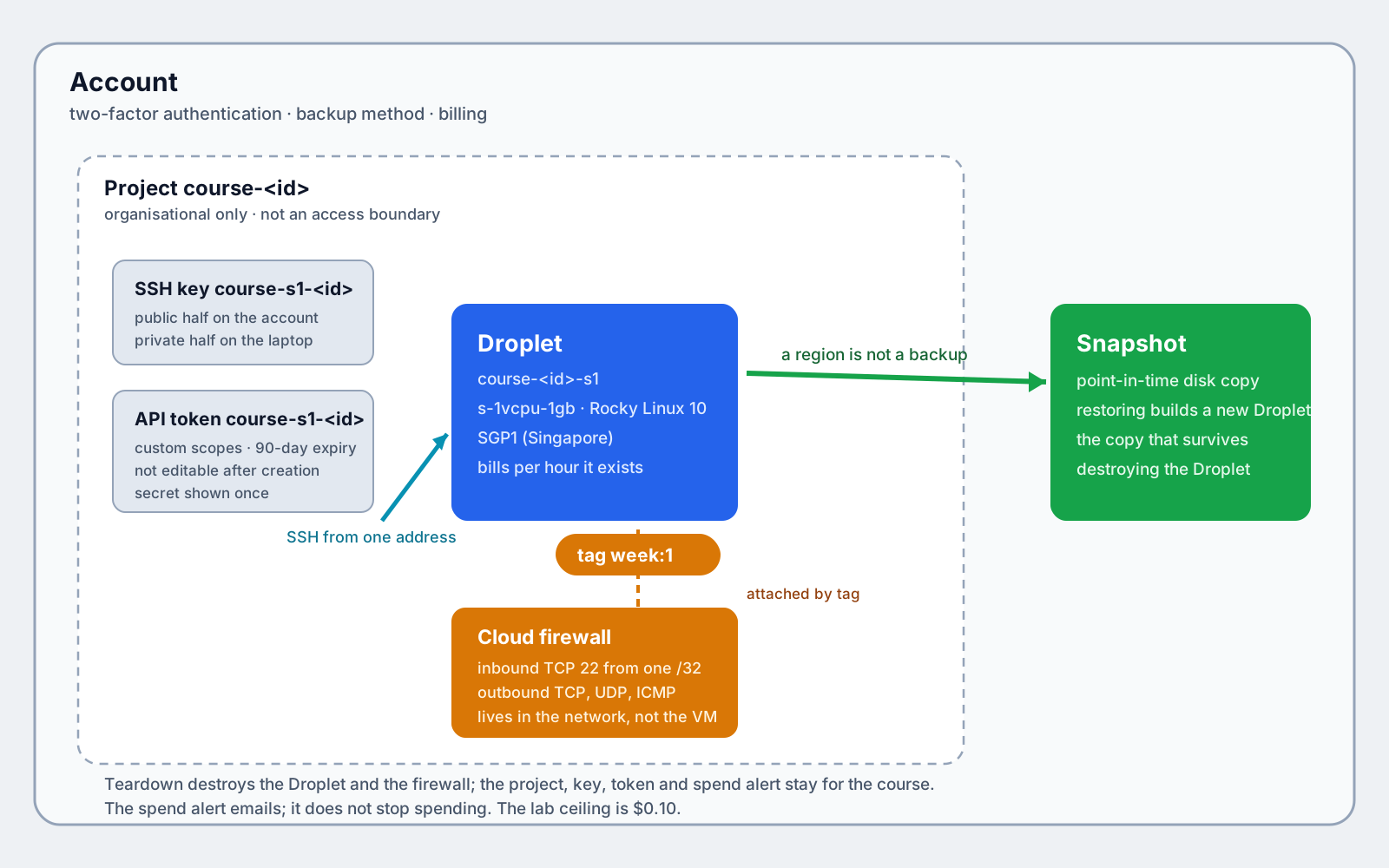
The scene shows the account hierarchy and the smallest useful deployment: a Droplet inside SGP1, a firewall in front of it, the SSH key that opens it, and a snapshot copy behind it. Hover an object to read its role; drag to orbit and scroll to zoom.
Drag to orbit, scroll to zoom. Hover an object for its role.
Reading the scene. The account contains a project, which contains the Droplet. The firewall sits in front of the Droplet and admits SSH from one address; the key is what the firewall's rule lets through. The snapshot sits beside the Droplet, outside its failure domain, and is the only copy that survives destroying the Droplet. The tag week:1 is the link between the firewall and the Droplet: the firewall follows the label, not the machine.
Figure 1.1 — Account, project, Droplet, firewall, key, tag and snapshot: the objects the S1 lab creates, and the two links that matter.
Hierarchy at a glance.
Level
Object
Created by
Deleted at teardown?
Account
DigitalOcean account + 2FA
Student, pre-course
No
Organisation
Project course-<id>
Panel or doctl projects create
No — kept for the course
Access
SSH key course-s1-<id> and token course-s1-<id>
Panel; key also by doctl
No — token expires
Network
Firewall course-<id>-s1, attached by tag week:1
Panel or doctl compute firewall create
Yes
Compute
Droplet course-<id>-s1
Panel or doctl compute droplet create
Yes
Durability
Snapshot of the Droplet
Panel or doctl compute droplet-action snapshot
Extension only
A static version of the same diagram is available if WebGL is unavailable.
Prerequisite: A DigitalOcean account with two-factor authentication and a backup method, the instructor added as a Resource Viewer and a $10 spend alert; an SSH key pair and a scoped API token. Set it up in Session 0: Accounts, SSH keys.
Lab — Account, first VM, firewall and spend alert
Time: 120 minutes — 10 setup, 10 project and tags, 10 SSH key, 10 token, 15 firewall including the lockout drill, 15 Droplet and first login, 5 spend alert, 5 buffer, 20 evidence, 10 teardown.
Prerequisite: the pre-course checklist — a DigitalOcean account with two-factor authentication and a backup method, the instructor added as a Resource Viewer, doctl installed, and a payment method on the account. The card is required at signup; spend alerts are email thresholds, not caps.
You need to know: DigitalOcean separates the object that groups resources (a project) from the object that admits traffic (a cloud firewall) and the credential that authorises commands (an API token). A project is organisational only; it is not an access boundary. A firewall attached by tag protects every Droplet that later carries that tag. A token's custom scopes are fixed at creation, so choosing too few means creating a new token, not editing the old one. A Droplet bills while it exists, including while it is powered off; only destroying it stops the meter.
Safe-data acknowledgement: I have read the lab safe-data policy. I will use only the synthetic media supplied with the course, and I will not upload real personal media — or real account identifiers, emails or tokens in a screenshot — to any cloud service.
Task
Create a safe DigitalOcean identity, a project, an SSH key, a scoped API token, a default-deny firewall and one small Rocky Linux 10 Droplet in SGP1. Prove the first key-only login, break your own SSH access and recover it through the Control Panel, set a $10 spend alert, capture the evidence, and tear the Droplet and firewall down. The lab must stay under $0.10.
Steps
1. Pre-flight: account, two-factor and the scoped token
Panel path: Account → Settings, check that 2FA shows Enabled and a backup method is listed. Panel path for membership: Teams → Members, confirm the instructor appears as Resource Viewer.
Panel path: API → Tokens → Generate New Token. Choose Custom scopes, name it course-s1-<id>, set the expiry to 90 days (or the longest offered), and select exactly:
Resource
Scopes
droplet
read, create, delete
ssh_key
read, create
firewall
read, create, update, delete
project
read, create, assign_resource
tag
read, create
account
read
region
read
size
read
image
read
billing
read
The secret is shown once; copy it into doctl auth init immediately. Custom scopes are per resource type and action — a token cannot be limited to one Droplet — and they cannot be edited after creation. If the Droplet commands later fail with a 403, a scope is missing: create a new token, do not hunt for an edit button. There is no CLI path for this step.
doctl auth init
Asks for the token and saves it in the default context. Paste the secret you just copied; it is not echoed as you type.
Restricts the saved token to your user account. On Linux the path is ~/.config/doctl/config.yaml. This file is a credential: never commit it, copy it into the repository, or paste its contents into a report.
Prints the doctl version and the API endpoint. The course was verified with doctl 2.4.0; an older release may not know doctl projects or doctl balance get.
Checks that the Rocky Linux 10 image slug exists in the public catalogue and prints it back. No output means the slug is unavailable in this account or region; stop and use the image ID the panel shows instead of guessing.
doctl account get
Calls the account endpoint and prints the account email, team and Droplet limit. Success proves the token is valid. Do not screenshot this output: it contains the account email. In the evidence, describe it as "account read confirmed".
doctl balance get
Records the starting month-to-date usage. Note the third column: the lab's cost is the difference between this value and the value at teardown, so a starting number is part of the evidence.
Creates the project and prints its UUID. Record the UUID: the Droplet is assigned to the project at creation, and the project cannot be an access boundary, so its value is organisational.
doctl compute tag create "week:1"
Creates the tag that the firewall follows. Tags allow letters, numbers, colons, dashes and underscores; = is not allowed. If the tag already exists the call fails harmlessly — move on.
Generates an ed25519 keypair. The public half is ~/.ssh/do_s1.pub; the private half is ~/.ssh/do_s1 and never leaves the laptop. ed25519 is the current default and produces a short key that is hard to get wrong.
chmod 600 ~/.ssh/do_s1
Makes the private key readable only by you. SSH refuses to use a key with looser permissions, so this also prevents a frustrating "bad permissions" error later.
Uploads only the public half to the account. The account stores it as a named key that a Droplet can reference at creation.
doctl compute ssh-key list --format ID,FingerPrint,Name --no-header
Lists the account's keys with their fingerprints. The Name column makes the row easy to find; record the ID and fingerprint for the Droplet step.
ssh-keygen -E md5 -lf ~/.ssh/do_s1.pub
Prints the MD5 fingerprint of your local public key, the same form doctl lists. The value must match the doctl row — that equality is the evidence that the key you hold is the key the account holds.
Panel path: Networking → Firewalls → Create Firewall, name it course-<id>-s1, add an inbound rule SSH / TCP 22 / your IP, keep all outbound TCP, UDP and ICMP allowed, and attach it to the tag week:1.
MYIP=$(curl -s https://api.ipify.org)
Asks a public service for the address your laptop appears to use, and stores it in MYIP. The firewall will allow SSH from that single address and nothing else, so a café network change later means updating the rule.
Creates the firewall and prints its ID. /32 means one address, not a range. With no rule for any other inbound port, the default is deny. The three outbound rules let the Droplet fetch packages, resolve DNS and answer ping; a Droplet with no outbound rules is very hard to debug.
doctl compute firewall get <firewall-id>
Prints the firewall's name, status, inbound and outbound rules, and the tags it follows. Read the Inbound Rules block: it must contain exactly one TCP 22 rule whose address ends in /32. Anything else is a defect you fix before creating the Droplet.
Panel path: Droplets → Create Droplet; choose SGP1, Rocky Linux 10, the Basic plan $6/mo (s-1vcpu-1gb), the SSH key course-s1-<id>, the tags course:42-05-0112, student:<id> and week:1, and the project course-<id>.
Creates the Droplet and waits until it is active. --ssh-keys accepts the key ID from step 3, not a file path; --tag-names applies all three labels, one of which (week:1) attaches the firewall; --project-id files it under the course project at creation. --wait returns only when the Droplet is running, so the next command can use its address.
doctl compute droplet get <droplet-id> --format PublicIPv4 --no-header
Prints the IPv4 address assigned to the Droplet. That address is what SSH uses, and it changes if the Droplet is destroyed and rebuilt.
mkdir -p data
Creates the data/ folder the evidence files are saved into if it is not already present.
doctl compute droplet list -o json > data/droplet-before.json
Saves the account's Droplet list as JSON before teardown. The notebook reads the fields that prove the Droplet's name, region, size, image, tags and status. On a fresh student account this file contains exactly one Droplet.
Opens the first key-only session and runs two short commands. hostname prints the Droplet's generated name and id prints uid=0(root); together they prove the key works and that you are root. DigitalOcean disables password authentication on key-created Droplets, so there is no password prompt to fall back on.
exit
Closes the SSH session and returns you to the laptop. Nothing on the Droplet depends on the session staying open.
6. Failure drill: lock yourself out and recover from the panel
This is the session's deliberate failure. You will make the firewall reject your own address, watch SSH time out, then restore access from the Control Panel — which proves the management plane works even when the data plane does not.
Panel path: Networking → Firewalls → course--s1 → Rules → Inbound SSH → Edit, change the source to 203.0.113.1/32 (the TEST-NET address that stands for "somewhere else"), and save.
Attempts the login under the broken rule. It must time out or be refused: the firewall drops packets from your address before they reach the Droplet. A timeout here is the expected result, not a bug.
Panel path: Networking → Firewalls → course--s1 → Rules → Inbound SSH → Edit, restore the source to $MYIP/32 and save.
Attempts the same login after the panel change. It must succeed again within a few seconds. Record the elapsed time: DigitalOcean applies firewall rule changes quickly, and the number is part of your evidence.
doctl compute firewall get <firewall-id> -o json > data/firewall-before.json
Saves the restored firewall configuration as JSON before teardown. The notebook asserts one inbound TCP 22 rule from a single /32 address and the three outbound rules.
API extension. The panel is the required recovery path because it is out-of-band. The same change can be made through the API, and the reference run uses it to measure propagation:
Restores the rule from your address. Run it only after you have watched the timeout; this is the API path, and the panel path is what the brief requires you to demonstrate.
สรุปภาษาไทย
แบบฝึกความล้มเหลวโดยตั้งกฎขาเข้าชั่วคราวให้รับเฉพาะ 203.0.113.1/32 แล้วลอง SSH จะหมดเวลา จากนั้นแก้กฎกลับผ่าน Control Panel ซึ่งพิสูจน์ว่าระนาบจัดการยังใช้งานได้แม้ระนาบข้อมูลล้มเหลว บันทึกเวลาที่กฎมีผลและบันทึกไฟร์วอลล์เป็น JSON ภาคผนวกแสดงเส้นทาง API ที่ใช้ทดสอบเวลาการปรับใช้
中文总结
演练一次故障:临时设置一条入站规则,只接受 203.0.113.1/32,然后尝试 SSH,连接会超时。接着通过 Control Panel 把规则改回来,这证明即使数据平面失效,管理平面仍然可用。记录规则生效的时间,并把防火墙保存为 JSON。附录展示用于测试生效时间的 API 路径。
7. Set the spend alert and read the bill
Panel path: Billing → Spend alerts → Add alert, set a $10 monthly budget and percentage email thresholds, then Billing → Insights for the current usage view.
doctl balance get
Prints the month-to-date balance, the account balance and month-to-date usage. Record the usage before and after the lab; the difference is the lab's real cost. There is no CLI path for creating a spend alert — it is panel-only, and the email is a warning, not a cap.
Take the ten items in the evidence bundle below. Redact the account email, account UUID, project UUID and every token value; a token page is captured with the secret covered and the expiry date visible. Copy the four JSON files into data/ and run the notebook.
Your shell can produce item 8 for you:
history > data/commands-raw.log
Writes the commands you typed to a raw file. Open it, delete or replace the account email, UUIDs, tokens and IP addresses, save the result as data/commands-host.log, and delete the raw file. The published log is the sanitized one; a raw trace is never submitted.
9. Tear down and prove the account is clean
Panel path: Droplets → course--s1 → Destroy and Networking → Firewalls → course--s1 → Delete. If you used the Control Panel, capture the confirmation dialogs; the CLI is faster and produces machine-checkable JSON.
doctl compute droplet delete <droplet-id> --force
Destroys the Droplet without a confirmation prompt. This is the command that stops the meter; powering off would not.
Deletes the firewall. It has no cost, but leaving it behind means later Droplets that carry week:1 are silently protected by a rule you have forgotten.
doctl compute droplet list -o json > data/droplet-after.json
Saves the post-teardown Droplet list. On a fresh account it is an empty array; the notebook also accepts an account with unrelated Droplets as long as no week:1 Droplet remains.
doctl compute firewall list -o json > data/firewall-after.json
Saves the post-teardown firewall list. The proof is the same: no firewall carrying week:1.
doctl balance get
Reads the bill after teardown. Month-to-date usage minus the starting value must be under the $0.10 ceiling; an idle Droplet left behind would keep the number growing.
If you ran on a shared instructor slot, also remove the objects the lab created so the next student starts clean:
doctl projects delete <project-uuid> --force
Deletes the project. On your own account, keep it for the course.
doctl compute ssh-key delete <key-id> --force
Deletes the imported public key. On your own account, keep it for the course.
The 2FA and backup-method page, captured pre-course.
The project and the three Droplet tags.
The SSH key fingerprint from doctl and ssh-keygen side by side.
The token page with the secret covered: scopes and expiry visible.
The firewall rules: one inbound TCP 22 /32, three outbound rules, tag week:1.
The running Droplet with its IP, and the first-login proof (hostname and uid=0(root)).
The $10 spend-alert screenshot.
The sanitized command log — no token, account ID or email.
The empty post-teardown lists, doctl balance get, and the Insights view.
A 150–250 word what this proves note.
The notebook's inventory.json is the machine-checkable companion. The failure-drill log (the timeout, the panel change, the successful retry and the elapsed time) belongs inside item 5.
Cost ceiling
Under $0.10. The main spender is one s-1vcpu-1gb Droplet at $0.00893/hour, so the ceiling is about eleven Droplet-hours. The firewall, project, key, tag and spend alert are free. Read doctl balance get at the start and the end; record both numbers and the difference.
Teardown
Destroy the Droplet, delete the firewall, then prove both lists are empty of week:1 resources. Read the bill. Keep the project, SSH key, token and spend alert on your own account for the rest of the course; delete the project and key only if you used a shared instructor slot. The token expires after 90 days by design.
Failure and recovery chain
No card or signup blocked: use an instructor-owned account slot; the evidence shape does not change. Item 1 becomes the instructor's 2FA page.
doctl blocked on the network: follow the panel checklist instead; capture each panel screen. The JSON evidence is replaced by screenshots and the instructor records the deviation.
Outbound SSH blocked: use the Droplet's browser console for the login proof now, and repeat the SSH login from another network before submission.
Droplet creation fails with 403: the token is missing a scope. Create a new token with the full table in step 1; tokens cannot be edited.
Private key lost: Rocky Linux's root password cannot be reset from outside. Destroy the Droplet and repeat steps 5–9 with a new key. This is why key custody is a warning, not a drill.
Self-study: the domain and Cloudflare zone (due before Session 2)
The CDN session assumes a domain you own and a Cloudflare zone that is already active. Do this outside the two-hour lab, before Session 2; the TA checks it at the start of S2.
Register a cheap root domain (about $8–12/year, paid by you — it is your asset, not a course purchase). Do not register a subdomain: Cloudflare Free cannot host a subdomain as its own zone.
Create a free Cloudflare account, choose Add a site, enter the root domain, and take the Free plan.
At your registrar, replace the registrar's nameservers with the two Cloudflare nameservers shown in the dashboard. Propagation can take up to 24 hours.
Prove it:
dig NS <root-domain> +short
Prints the nameservers that answer for your domain. The two names must end in .ns.cloudflare.com; an empty or registrar answer means the change has not propagated yet. Take a screenshot of the Cloudflare zone in the Active state as the second proof. The instructor's demo hostname is a fallback for Session 4, not a substitute for your own zone.
The published sequence above is the learner form. The reference run executes it end to end and records the differences below, so no executed command is unexplained. The ssh-keygen call omits the passphrase prompt and writes to a temporary path; the SSH poll repeats the login until the Droplet answers; the image check is the same one from step 1.
COMMANDS.md records the executed order and the sanitized trace is data/commands-host.log.
Notebook
Open the lab notebook. Save the four JSON files into data/, set LAB_START and LAB_FINISH to your lab's ISO-8601 window (or edit the two values in the cost cell), and run the notebook top to bottom. It writes inventory.json; the final assertion is the completion gate.
Downloads for this session
Each document name opens a rendered view you can read in the browser. The download link beside it gives you the raw Markdown working file: the copy you edit, run and submit. The page above and the lab steps carry the teaching.
The runnable notebook that produces the lab's numbers.
Research question
Under what conditions should the campus media unit keep predictable production work on-premises or at the edge rather than renting it from DigitalOcean?
Submit an 800–1,200 word answer with 5–8 sources at the next session. The rubric and the exemplar guidance show the expected shape.
References — Session 1
Armbrust, M., Fox, A., Griffith, R., Joseph, A. D., Katz, R., Konwinski, A., Lee, G., Patterson, D., Rabkin, A., Stoica, I., & Zaharia, M. (2010). A view of cloud computing. Communications of the ACM, 53(4), 50–58. https://doi.org/10.1145/1721654.1721672
Digital-media relevance: defines elasticity and pay-as-you-go, the economics the unit relies on when its 40-video month meets an idle week.
Still open: when is predictable, high-volume transcoding cheaper on owned hardware than on metered capacity?
Figures: third-party; do not copy without permission — redraw any diagram.
Satyanarayanan, M. (2017). The emergence of edge computing. Computer, 50(1), 30–39. https://doi.org/10.1109/MC.2017.9
Digital-media relevance: explains why distance and bandwidth, not compute, limit interactive media delivery to Chiang Mai viewers.
Still open: what edge footprint is justified for a low-volume regional catalogue when the origin sits in Singapore?
Figures: third-party; redraw by default.
Buyya, R., Yeo, C. S., Venugopal, S., Broberg, J., & Brandic, I. (2009). Cloud computing and emerging IT platforms: Vision, hype, and reality for delivering computing as the 5th utility. Future Generation Computer Systems, 25(6), 599–616. https://doi.org/10.1016/j.future.2008.12.001
Digital-media relevance: frames IaaS, PaaS and SaaS and the service-level language the session and the lab use.
Still open: how comparable are provider SLAs for media-specific guarantees such as sustained egress?
Figures: third-party; redraw by default.
Teaching note. Narrate the anchor (Armbrust et al.) for 5–8 minutes, assign the Satyanarayanan abstract, and close by restating the open problem as the weekly question: under what conditions should the unit keep predictable production work on-premises or at the edge rather than renting it from DigitalOcean? Figures are third-party unless stated; redraw by default.
PLO — Session 1: Cloud foundations
CLO: By the end of this session, the student can explain why a media unit rents elastic capacity and set up a safe, budgeted DigitalOcean account.
PLO
Role
Research answer
Lab evidence
Points
Evidence
Rubric
PLO1
primary
4
0
4
800–1,200-word answer with 5–8 sources; the cloud-vs-on-prem argument for the unit
Research 4/3/2/1
PLO3
secondary
0
3
3
The ten-item account, token, firewall, first-login, spend-alert and teardown bundle, plus inventory.json
Lab 3/2/1/0
Total
4
3
7
Total: 7 points
Four-level descriptors
Research (4/3/2/1). 4 = a defensible thesis, 5–8 credible sources with independent evidence, a counterargument, the fact sheet applied, correct citations. 3 = a sound answer with curated sources and some independent evidence. 2 = a summary that only partly answers the question. 1 = a comprehension summary with fewer than five sources or no citations. 0 = nothing submitted or misconduct.
Lab (3/2/1/0). 3 = complete and correct evidence, reproducible, the note explains the trade-off, teardown and cost respected. 2 = mostly correct, thin trade-off. 1 = partial evidence, incomplete teardown. 0 = nothing submitted, unsafe data, or no teardown.
The full course arithmetic and the ten questions are in the assessment note; this file is the weekly instance.